
Introduction
AI videos have become one of the biggest trends on Instagram Reels, TikTok, YouTube Shorts, and Facebook. Romantic couple AI videos are especially popular because they combine beautiful cinematic scenes, emotional storytelling, and realistic AI-generated visuals. Even if you don’t have professional editing skills or expensive camera equipment, AI tools now make it possible to create stunning love-story videos in just a few minutes.
In this complete guide, you’ll learn everything from choosing the right AI tools to generating cinematic scenes, adding realistic motion, background music, voiceovers, and exporting a high-quality video ready for social media.
Image Prompt:-
Video Prompt:-
What is a Romantic Couple AI Video?
A Romantic Couple AI Video is a short cinematic video created using Artificial Intelligence. Instead of filming real actors, AI generates beautiful scenes featuring a couple in romantic locations such as:
- Beach during sunset
- Mountain landscapes
- Rainy streets
- Cherry blossom gardens
- Snowfall scenery
- Luxury rooftop dinner
- Forest with golden sunlight
- Moonlight lakeside
These videos often include slow-motion walking, hand-holding, hugs, dancing, proposal scenes, and emotional eye contact.
Best AI Tools for Creating Romantic Videos
1. Google Veo
One of the most advanced AI video generators capable of creating realistic cinematic scenes from text prompts.
Best For:
- Ultra realistic videos
- Natural human movement
- 4K cinematic quality
2. Kling AI
Excellent for generating emotional scenes with realistic facial expressions.
Features
- Romantic animations
- Slow motion
- Hug scenes
- Walking scenes
- Rain effects
3. Hailuo AI
Perfect for beginners who want high-quality videos with simple prompts.
4. PixVerse AI
Ideal for creating fantasy romantic scenes.
Supports
- Anime style
- Cinematic style
- Realistic style
5. Runway ML
Useful for editing, extending, and improving AI-generated videos.
Step 1: Write a Good AI Prompt
The prompt determines how your final video will look.
A weak prompt creates average results.
A detailed prompt creates cinematic masterpieces.
Example Prompt
A beautiful young couple walking hand in hand on a peaceful beach during golden sunset, soft ocean waves, warm sunlight reflecting on the water, cinematic camera movement, emotional expressions, realistic skin texture, flowing hair, romantic atmosphere, ultra realistic, 4K, shallow depth of field, slow motion, movie quality.
Step 2: Choose the Right Camera Movement
Camera motion makes AI videos look professional.
Popular camera movements include:
- Slow Zoom In
- Zoom Out
- Drone Shot
- Orbit Camera
- Tracking Shot
- Side Walk
- Close-Up
- Cinematic Dolly
- Crane Shot
Example
“A romantic couple hugging while the camera slowly circles around them.”
Step 3: Select a Beautiful Location
The background creates emotion.
Popular romantic locations:
- Sunset Beach
- Paris Street
- Lavender Field
- Cherry Blossom Garden
- Luxury Hotel Rooftop
- Mountain Lake
- Snowy Forest
- Flower Garden
- Candle Light Dinner
- Rainy City Night
Step 4: Add Emotional Actions
Instead of making characters stand still, describe natural actions.
Examples
- Holding hands
- Looking into each other’s eyes
- Hugging
- Dancing
- Smiling
- Running together
- Proposal scene
- Forehead kiss
- Slow walk
- Sitting together watching sunset
Step 5: Improve the Lighting
Lighting completely changes the mood.
Recommended lighting styles
- Golden Hour
- Sunset Glow
- Warm Light
- Soft Light
- Moonlight
- Candle Light
- Rain Reflection
- Neon Romance
- Morning Sunshine
Step 6: Generate Multiple Clips
Instead of making one long video, create several short clips.
For example:
Scene 1
Walking on beach
Scene 2
Holding hands
Scene 3
Looking at sunset
Scene 4
Hugging
Scene 5
Kissing forehead
Scene 6
Camera zoom out
Combine all scenes for a more engaging final video.
Step 7: Add Background Music
Music creates emotion.
Choose:
- Romantic Piano
- Soft Guitar
- Emotional Instrumental
- Violin
- Love Theme
- Cinematic Orchestra
Keep the music balanced so it complements the visuals.
Step 8: Add AI Voiceover
A soft voiceover can make the story more emotional.
Example
“True love is not about perfect moments. It is about finding happiness in every little moment together.”
Step 9: Add Cinematic Effects
Professional creators often include:
- Film Grain
- Lens Flare
- Slow Motion
- Light Rays
- Motion Blur
- Dust Particles
- Bloom
- Glow Effects
- Bokeh Lights
These effects enhance the cinematic feel without overwhelming the scene.
Step 10: Export the Video
Recommended settings:
- Resolution: 1080p or 4K
- Frame Rate: 30 FPS or 60 FPS
- Aspect Ratio: 9:16 for Shorts/Reels
- Format: MP4 (H.264)
Best Prompt Example
Romantic Beach Scene
A handsome young couple walking hand in hand on a tropical beach during golden sunset, warm sunlight reflecting on gentle ocean waves, soft breeze moving their hair and clothes, emotional smiles, cinematic drone shot, ultra realistic skin details, movie quality, shallow depth of field, volumetric lighting, romantic atmosphere, slow motion, 4K HDR.
Common Mistakes to Avoid
- Using very short prompts
- Adding too many unrelated actions
- Ignoring camera movement
- Poor lighting descriptions
- Low-quality music
- Overusing visual effects
- Exporting at low resolution
Tips to Make Your AI Video Go Viral
- Start with an emotional first 3 seconds.
- Use trending romantic music.
- Keep the video between 15–30 seconds for Shorts and Reels.
- Add smooth transitions between scenes.
- Use realistic cinematic prompts.
- Upload in Full HD or 4K.
- Write an engaging caption with relevant hashtags.
- Post consistently and analyze audience engagement.
Conclusion
Creating a Romantic Couple AI Video has never been easier. With modern AI tools like Google Veo, Kling AI, Hailuo AI, PixVerse, and Runway ML, anyone can produce breathtaking cinematic love-story videos without expensive equipment. Focus on writing detailed prompts, choosing emotional actions, using beautiful lighting, and editing multiple short clips into one polished video. With creativity and consistency, your AI-generated romantic videos can attract millions of views across social media platforms.
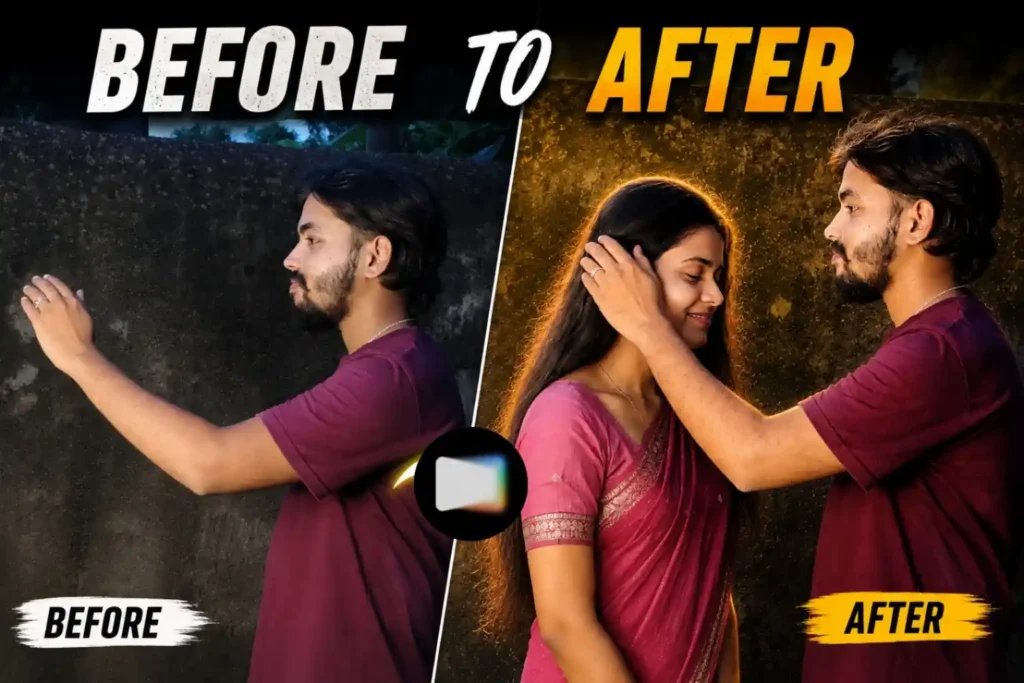
Image prompt
INPUT: One uploaded photo of a single adult man.
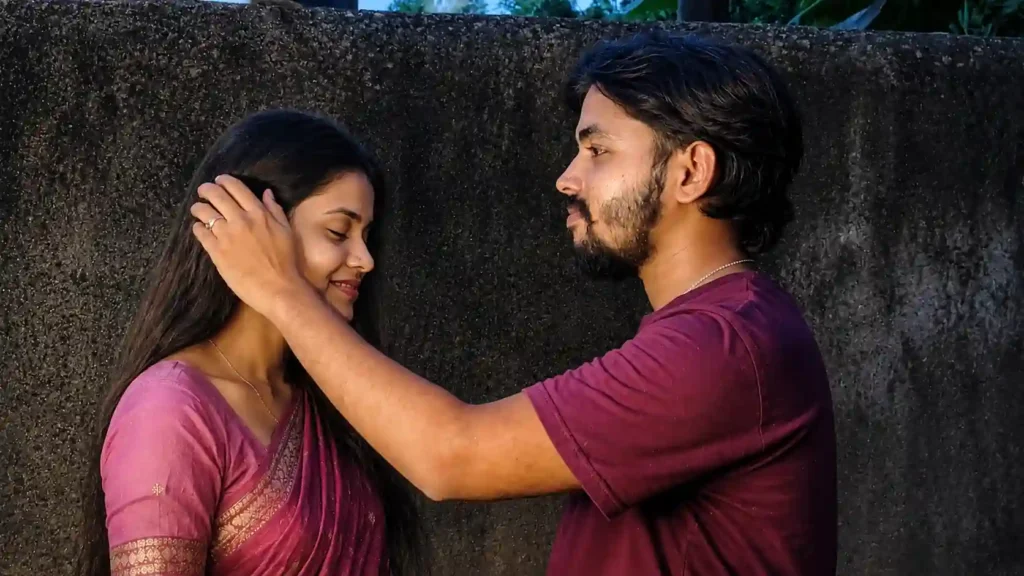
TASK: Transform the uploaded single-person photograph into an ultra-photorealistic couple photograph by naturally adding one fictional adult South Asian/Indian woman beside the man.
1. MALE IDENTITY — ABSOLUTE PRIORITY
Use the uploaded photograph as the ONLY identity reference for the man.
Preserve the man’s identity with maximum accuracy.
Keep exactly:
– Face shape
– Jawline
– Cheek structure
– Nose shape
– Eyes and eye spacing
– Eyebrow shape and thickness
– Lips
– Beard/mustache pattern
– Hairline
– Hairstyle
– Skin tone
– Natural facial asymmetry
– Natural skin texture
– Recognizable facial imperfections
– Body proportions whenever visible
DO NOT beautify, redesign, replace, or reinterpret the man’s face.
The final image must clearly look like the same real person from the uploaded photograph.
Do not change his identity merely to make the image more attractive.
2. ADD ONE ADULT WOMAN
Generate one fictional adult woman (18+) who naturally fits the man’s appearance, environment, clothing style and overall scene.
She should look like a realistic South Asian/Indian woman with:
– Natural facial features
– Realistic skin texture
– Natural hair
– Realistic body proportions
– Appropriate clothing for the environment
– Subtle, tasteful styling
– Completely natural appearance
She must be an original fictional person and must NOT imitate or reproduce the identity of any real person.
3. AUTOMATIC POSE SELECTION
Do NOT use one fixed pose.
Analyze the man’s original:
– Body position
– Camera angle
– Facial direction
– Environment
– Lighting
– Clothing
– Available space in the frame
Then automatically choose the most natural couple pose that fits the original photograph.
Possible poses include, but are not limited to:
– Standing side-by-side
– Standing close together
– Looking at each other
– Looking toward the camera together
– Woman standing slightly behind the man
– Man gently touching her hair
– Holding hands
– Walking together
– Sitting together
– Woman resting her head lightly on his shoulder
– Man’s arm naturally around her shoulder
– Casual candid conversation
– Looking at each other and smiling
– A natural candid moment captured mid-action
Randomize the pose naturally for every generation while keeping the man’s identity unchanged.
Do not force a pose that conflicts with the original image.
4. SCENE PRESERVATION
Whenever possible, preserve the original:
– Location
– Background
– Lighting direction
– Time of day
– Camera perspective
– Overall color atmosphere
– Original man’s clothing
Place the woman naturally into the same physical environment.
She must appear to have actually been present when the photograph was taken.
Match:
– Perspective
– Scale
– Lighting
– Shadows
– Color temperature
– Depth of field
– Image grain
– Camera characteristics
5. REALISTIC INTERACTION
The couple should have believable physical positioning.
Hands, arms, shoulders and body proportions must be anatomically correct.
If they touch:
– Fingers must be correctly formed
– Hands must connect naturally
– No fused limbs
– No floating hands
– No overlapping body distortions
The woman’s position must respect realistic depth and perspective.
6. CLOTHING
Keep the man’s original clothing unless explicitly instructed otherwise.
Generate the woman’s outfit based on the environment and selected pose.
Possible outfits:
– Saree
– Salwar suit
– Kurti
– Casual Indian outfit
– Jeans and top
– Elegant traditional outfit
Choose whichever looks most natural for the scene.
7. PHOTOGRAPHIC REALISM
The final result must look like a real photograph captured by a professional camera, not an AI composite.
Use:
– Natural skin pores
– Individual hair strands
– Realistic fabric texture
– Accurate shadows
– Natural depth of field
– Realistic reflections
– Physically consistent lighting
– Authentic camera perspective
– Subtle photographic grain
The woman must have the same image quality and photographic characteristics as the original man.
8. COMPOSITION
Automatically create the best composition based on the uploaded photograph.
Do not unnecessarily crop or change the man’s face.
The couple should look naturally composed within the available frame.
If the original photograph has limited space, intelligently reposition or extend the environment while maintaining visual consistency.
9. NEGATIVE PROMPT
No identity change, no face swap, no face morphing, no beautification of the man, no different hairstyle for the man, no altered beard, no altered facial structure, no duplicate person, no extra people, no extra arms, no extra hands, no extra fingers, missing fingers, fused fingers, distorted anatomy, unnatural body proportions, floating limbs, duplicated objects, warped clothing, artificial skin, plastic face, CGI appearance, cartoon appearance, unrealistic shadows, mismatched lighting, mismatched perspective, blurry faces, low resolution, unnatural expressions, unrealistic romantic pose.
FINAL INSTRUCTION
Take ANY single photo of an adult man and intelligently turn it into a believable couple photograph by adding one fictional adult woman.
The man’s identity is the highest priority.
The woman’s appearance, clothing, location interaction and pose should be automatically generated according to the original photograph.
Every generation may use a different natural couple pose and scene arrangement, but the man’s identity must remain consistent.
Final output: ultra-photorealistic, natural-looking couple photograph.
Image prompt
INPUT: One uploaded photo of a single adult man.
TASK: Transform the uploaded single-person photograph into an ultra-photorealistic couple photograph by naturally adding one fictional adult South Asian/Indian woman beside the man.
1. MALE IDENTITY — ABSOLUTE PRIORITY
Use the uploaded photograph as the ONLY identity reference for the man.
Preserve the man’s identity with maximum accuracy.
Keep exactly:
– Face shape
– Jawline
– Cheek structure
– Nose shape
– Eyes and eye spacing
– Eyebrow shape and thickness
– Lips
– Beard/mustache pattern
– Hairline
– Hairstyle
– Skin tone
– Natural facial asymmetry
– Natural skin texture
– Recognizable facial imperfections
– Body proportions whenever visible
DO NOT beautify, redesign, replace, or reinterpret the man’s face.
The final image must clearly look like the same real person from the uploaded photograph.
Do not change his identity merely to make the image more attractive.
2. ADD ONE ADULT WOMAN
Generate one fictional adult woman (18+) who naturally fits the man’s appearance, environment, clothing style and overall scene.
She should look like a realistic South Asian/Indian woman with:
– Natural facial features
– Realistic skin texture
– Natural hair
– Realistic body proportions
– Appropriate clothing for the environment
– Subtle, tasteful styling
– Completely natural appearance
She must be an original fictional person and must NOT imitate or reproduce the identity of any real person.
3. AUTOMATIC POSE SELECTION
Do NOT use one fixed pose.
Analyze the man’s original:
– Body position
– Camera angle
– Facial direction
– Environment
– Lighting
– Clothing
– Available space in the frame
Then automatically choose the most natural couple pose that fits the original photograph.
Possible poses include, but are not limited to:
– Standing side-by-side
– Standing close together
– Looking at each other
– Looking toward the camera together
– Woman standing slightly behind the man
– Man gently touching her hair
– Holding hands
– Walking together
– Sitting together
– Woman resting her head lightly on his shoulder
– Man’s arm naturally around her shoulder
– Casual candid conversation
– Looking at each other and smiling
– A natural candid moment captured mid-action
Randomize the pose naturally for every generation while keeping the man’s identity unchanged.
Do not force a pose that conflicts with the original image.
4. SCENE PRESERVATION
Whenever possible, preserve the original:
– Location
– Background
– Lighting direction
– Time of day
– Camera perspective
– Overall color atmosphere
– Original man’s clothing
Place the woman naturally into the same physical environment.
She must appear to have actually been present when the photograph was taken.
Match:
– Perspective
– Scale
– Lighting
– Shadows
– Color temperature
– Depth of field
– Image grain
– Camera characteristics
5. REALISTIC INTERACTION
The couple should have believable physical positioning.
Hands, arms, shoulders and body proportions must be anatomically correct.
If they touch:
– Fingers must be correctly formed
– Hands must connect naturally
– No fused limbs
– No floating hands
– No overlapping body distortions
The woman’s position must respect realistic depth and perspective.
6. CLOTHING
Keep the man’s original clothing unless explicitly instructed otherwise.
Generate the woman’s outfit based on the environment and selected pose.
Possible outfits:
– Saree
– Salwar suit
– Kurti
– Casual Indian outfit
– Jeans and top
– Elegant traditional outfit
Choose whichever looks most natural for the scene.
7. PHOTOGRAPHIC REALISM
The final result must look like a real photograph captured by a professional camera, not an AI composite.
Use:
– Natural skin pores
– Individual hair strands
– Realistic fabric texture
– Accurate shadows
– Natural depth of field
– Realistic reflections
– Physically consistent lighting
– Authentic camera perspective
– Subtle photographic grain
The woman must have the same image quality and photographic characteristics as the original man.
8. COMPOSITION
Automatically create the best composition based on the uploaded photograph.
Do not unnecessarily crop or change the man’s face.
The couple should look naturally composed within the available frame.
If the original photograph has limited space, intelligently reposition or extend the environment while maintaining visual consistency.
9. NEGATIVE PROMPT
No identity change, no face swap, no face morphing, no beautification of the man, no different hairstyle for the man, no altered beard, no altered facial structure, no duplicate person, no extra people, no extra arms, no extra hands, no extra fingers, missing fingers, fused fingers, distorted anatomy, unnatural body proportions, floating limbs, duplicated objects, warped clothing, artificial skin, plastic face, CGI appearance, cartoon appearance, unrealistic shadows, mismatched lighting, mismatched perspective, blurry faces, low resolution, unnatural expressions, unrealistic romantic pose.
FINAL INSTRUCTION
Take ANY single photo of an adult man and intelligently turn it into a believable couple photograph by adding one fictional adult woman.
The man’s identity is the highest priority.
The woman’s appearance, clothing, location interaction and pose should be automatically generated according to the original photograph.
Every generation may use a different natural couple pose and scene arrangement, but the man’s identity must remain consistent.
Final output: ultra-photorealistic, natural-looking couple photograph.