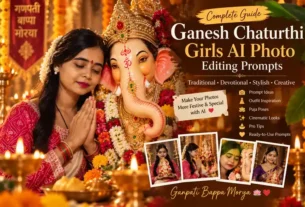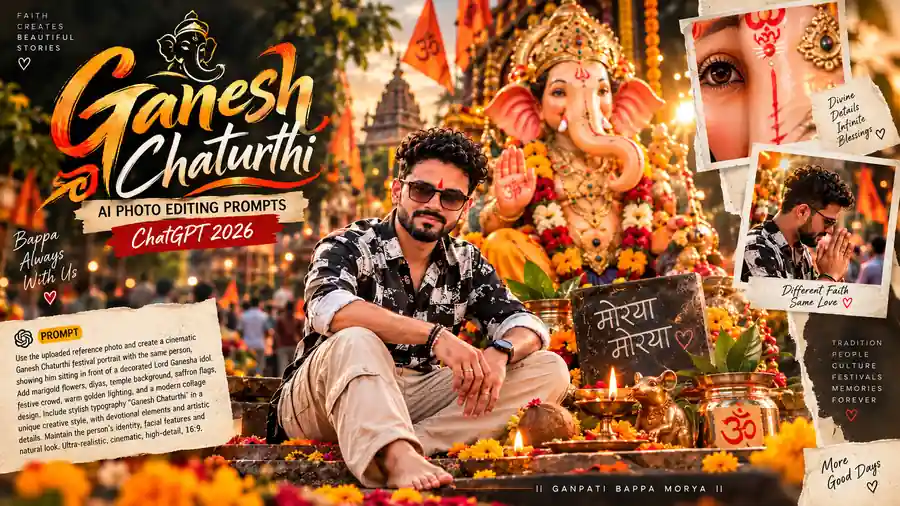
Ganesh Chaturthi sirf ek religious festival nahi, balki devotion, celebration aur beautiful memories ko capture karne ka bhi ek special occasion hai. Aaj ke time mein AI photo editing tools ki help se normal photo ko ek cinematic Ganesh Chaturthi devotional portrait ya premium festival poster mein transform kiya ja sakta hai.
Agar aapke paas ek simple portrait photo hai, to aap ChatGPT ke AI image editing capabilities ke liye carefully written prompt ka use karke us photo ko Ganesh Chaturthi theme mein edit karne ki koshish kar sakte hain. Ismein Lord Ganesha idol, marigold flowers, diyas, saffron flags, puja thali, golden lighting aur devotional typography jaise elements add kiye ja sakte hain.
Is article mein hum dekhenge ki Ganesh Chaturthi AI Photo Editing Prompts 2026 kaise likhein, reference photo kaise use karein, realistic identity consistency kaise maintain karein aur kis type ke prompts se premium results mil sakte hain.
Ganesh Chaturthi AI Photo Editing Prompt Kya Hai?
AI photo editing prompt ek detailed instruction hota hai jo AI ko batata hai ki uploaded photo mein kya change karna hai aur final image kaisi dikhni chahiye.
Example ke liye agar aap ek normal photo upload karte hain, to prompt mein aap specify kar sakte hain:
- Person ka face same rahe
- Hairstyle aur beard preserve ho
- Traditional kurta-pajama add ho
- Lord Ganesha idol background mein ho
- Marigold flowers aur diyas add hon
- Warm golden lighting ho
- Hindi festival typography ho
- Final image 4:5 poster format mein ho
Jitna clear prompt hoga, AI ke liye desired visual direction samajhna utna easy hota hai.
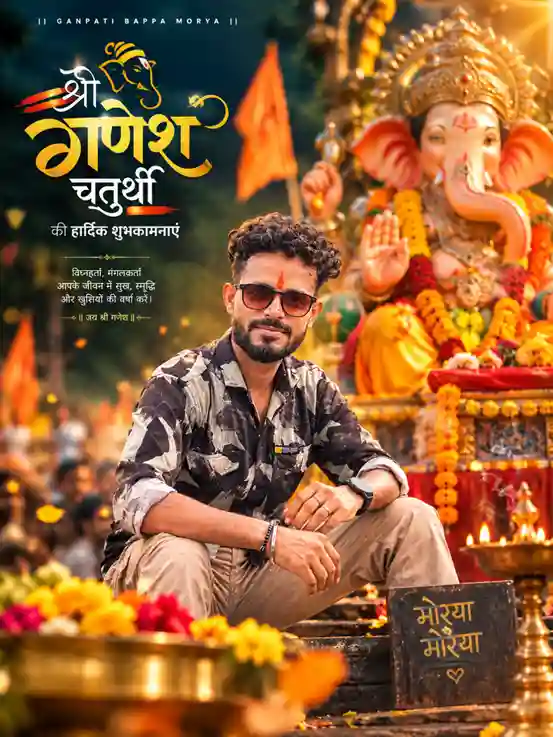
Prompt:
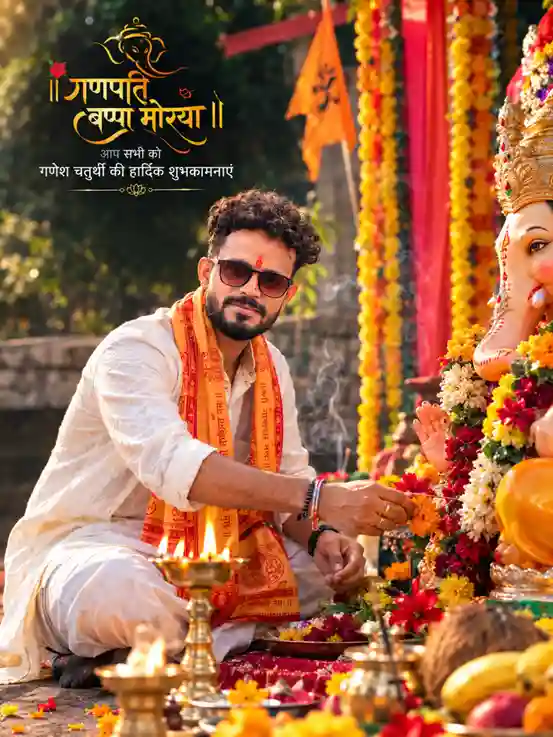
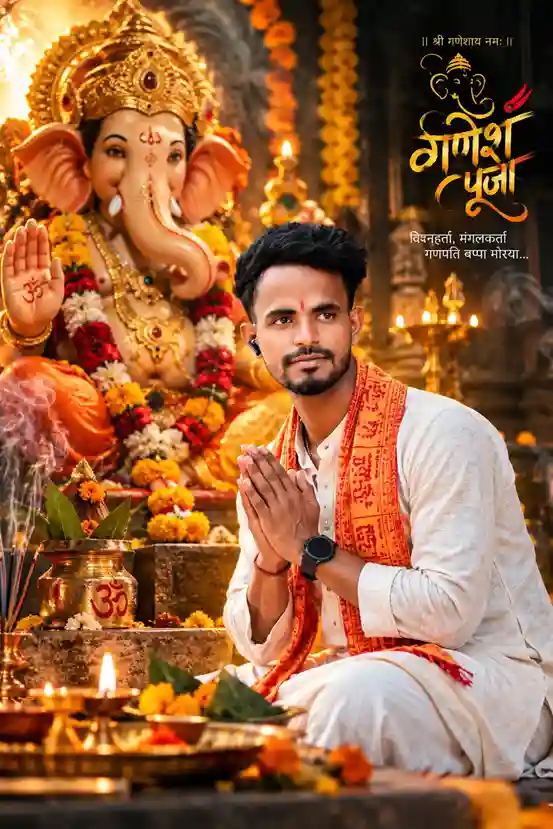
2026 Mein Ganesh Chaturthi AI Photo Editing Itna Popular Kyon Hai?
Social media par festival-themed photos ka trend kaafi strong hai. Instagram, Facebook, WhatsApp aur other platforms par log apni festive photos share karna pasand karte hain.
Traditional photo editing mein background removal, color grading, lighting correction aur graphic design ke liye multiple tools ki zarurat pad sakti hai. AI-based editing workflow mein in instructions ko ek detailed prompt ke through describe kiya ja sakta hai.
Is wajah se users ek single concept ke andar:
Photo + Background + Lighting + Festival Elements + Typography
ko combine karne ki koshish kar sakte hain.
Lekin ek important point yaad rakhein: sirf long prompt likhne se result automatically perfect nahi hota. Prompt ki clarity, uploaded reference image ki quality aur AI model ki capabilities bhi important hoti hain.
Best Ganesh Chaturthi AI Photo Editing Prompt Kaise Likhein?
Ek professional prompt ko generally kuch important sections mein divide karna useful hota hai.
1. Reference Photo Clearly Mention Karein
Sabse pehle AI ko batayein ki uploaded image identity reference hai.
Example:
“Use the uploaded reference photo as the primary identity reference.”
Iske baad facial identity, hairstyle, beard, skin tone aur body proportions preserve karne ki instruction di ja sakti hai.
2. Identity Consistency Par Focus Karein
Agar aap chahte hain ki edited image mein person recognizable rahe, to prompt mein identity consistency ko clearly mention karein.
Aap include kar sakte hain:
- Preserve facial structure
- Preserve skin tone
- Preserve hairstyle
- Preserve beard
- Preserve recognizable facial features
- Maintain natural facial proportions
- Do not replace the identity
Example:
“Preserve the person’s facial identity, facial structure, skin tone, hairstyle, beard and recognizable features accurately.”
Dhyan rahe, prompt mein instruction dena guarantee nahi hai. AI-generated image systems kabhi-kabhi facial details change kar sakte hain, especially complicated compositions mein.
3. Outfit Describe Karein
Festival portrait ko visually strong banane ke liye clothing ka description important hai.
Ganesh Chaturthi ke liye aap traditional outfit use kar sakte hain:
Option 1: White kurta-pajama + saffron stole
Option 2: Cream kurta + orange Nehru jacket
Option 3: White dhoti-kurta + traditional angavastram
Option 4: Modern printed shirt + festive background
Agar aap premium devotional look chahte hain, to white aur saffron/orange combination kaafi effective visual contrast create karta hai.
4. Lord Ganesha Idol Ka Detailed Description Dein
Sirf “Lord Ganesha idol” likhne ke bajay idol ki visual characteristics define karna better hota hai.
For example:
“A majestic Lord Ganesha idol with an ornate golden crown, traditional jewelry, marigold garlands, colorful flowers and rich red-and-gold clothing.”
Aap additional details bhi add kar sakte hain:
- Golden crown
- Decorative jewelry
- Marigold garlands
- Rose flowers
- Red-orange fabric
- Blessing hand
- Traditional mouse idol
- Diyas
- Temple decorations
Isse overall festival atmosphere more specific ho sakta hai.
5. Ganesh Chaturthi Background Add Karein
Background image ka mood decide karta hai ki final poster ordinary lagega ya cinematic.
Ek premium background ke liye aap include kar sakte hain:
- Orange and yellow marigold flowers
- Saffron flags
- Traditional decorative fabric
- Temple silhouettes
- Warm sunlight
- Festive crowd
- Diyas
- Incense smoke
- Floral decorations
Example:
“Create an authentic Indian Ganesh Chaturthi celebration environment with marigold garlands, saffron flags, glowing diyas and warm festive decorations.”
6. Cinematic Lighting Use Karein
Lighting AI portrait ko dramatically improve kar sakti hai.
Ganesh Chaturthi poster ke liye useful lighting terms:
- Warm golden lighting
- Golden-hour sunlight
- Volumetric light rays
- Soft highlights
- Natural shadows
- Atmospheric haze
- Cinematic contrast
- Warm orange-gold color grading
Example:
“Use warm golden-hour lighting with soft volumetric rays, realistic shadows and subtle atmospheric haze.”
7. DSLR Aur Lens Details Add Karein
Agar aap photographic look chahte hain, to prompt mein camera-style description add kar sakte hain.
Example:
“Professional DSLR photography, 85mm portrait lens look, shallow depth of field, realistic skin texture and cinematic bokeh.”
Isse desired photographic aesthetic ko communicate karne mein help mil sakti hai.
However, ek common mistake ye hai ki users prompt mein bahut saare camera specifications bhar dete hain. Har technical camera term output quality improve nahi karta. Composition, subject, lighting aur identity instructions usually zyada important hote hain.
8. Hindi Typography Add Karein
Festival poster mein Hindi text important visual element ho sakta hai.
Example:
“॥ श्री गणेश चतुर्थी ॥”
“की हार्दिक शुभकामनाएं”
Aur devotional line:
“गणपति बप्पा मोरया 🙏”
Aap typography ka position bhi specify kar sakte hain:
“Place elegant golden Hindi typography in the upper-left corner.”
Lekin AI-generated text mein spelling errors aa sakte hain. Agar exact Hindi typography bahut important hai, to practical workflow ye ho sakta hai ki background/image AI se generate karein aur final Hindi text Canva, Photoshop ya kisi graphic editor mein add karein.
9. Composition Clearly Define Karein
Image ka subject kahan hona chahiye, ye prompt mein mention karna useful hai.
For example:
“Place the person in the lower-left foreground and the large Ganesha idol in the upper-right background.”
Aap ye bhi define kar sakte hain:
- Person foreground mein
- Ganesha background mein
- Typography upper-left
- Diyas bottom foreground
- Flowers edges par
- Face unobstructed
Isse poster ki visual hierarchy better define hoti hai.
Best Ganesh Chaturthi AI Photo Editing Prompt
Agar aap ek ready-to-use premium prompt chahte hain, to ye structure use kar sakte hain:
Use the uploaded reference photo as the primary identity reference. Preserve the person’s facial identity, facial structure, skin tone, hairstyle, beard, body proportions and recognizable features accurately. Do not change or replace the person’s identity.
Create a highly realistic cinematic Ganesh Chaturthi devotional portrait. Show the person sitting peacefully in the foreground beside a magnificent Lord Ganesha idol, wearing an elegant traditional white kurta-pajama with a saffron-orange devotional stole.
Place a large beautifully decorated Lord Ganesha idol behind the person, featuring an ornate golden crown, traditional jewelry, colorful marigold garlands and rich red-and-orange festive decorations.
Add glowing brass diyas, fresh flowers, puja thali, incense smoke and subtle temple elements in the foreground.
Create a warm Indian Ganesh Chaturthi atmosphere with saffron flags, marigold decorations and soft golden sunlight.
Use cinematic DSLR photography, 85mm portrait lens look, shallow depth of field, realistic skin texture, natural facial details, warm golden lighting, realistic shadows, atmospheric haze, beautiful bokeh and professional color grading.
Add elegant Hindi typography:
“॥ श्री गणेश चतुर्थी ॥”
“की हार्दिक शुभकामनाएं”
“गणपति बप्पा मोरया 🙏”
Keep the typography clean and readable without covering the person’s face or the main Ganesha idol.
Vertical 4:5 composition, premium Indian festival poster aesthetic, photorealistic, ultra-detailed, high dynamic range, realistic materials, 4K quality.
Negative prompt: distorted face, changed identity, different person, plastic skin, artificial face, extra fingers, malformed hands, duplicate person, duplicate Ganesha, unrealistic anatomy, blurry face, cartoon look, low resolution, oversaturated colors, watermark, unwanted text.
Ganesh Chaturthi Ke Liye Different AI Photo Ideas
Ek hi type ka portrait repeatedly generate karne ke bajay aap different concepts try kar sakte hain.
1. Traditional Ganesh Puja Portrait
Person white kurta-pajama mein ho, hands folded namaste pose mein ho aur saamne Lord Ganesha idol ho.
Mood: Divine + Peaceful
2. Ganpati Bappa Festival Portrait
Person modern outfit mein ho aur background mein grand Ganesh Chaturthi celebration ho.
Mood: Festive + Stylish
3. Puja Thali Portrait
Person ke hands mein decorated puja thali ho, jisme diyas aur flowers hon.
Mood: Traditional + Emotional
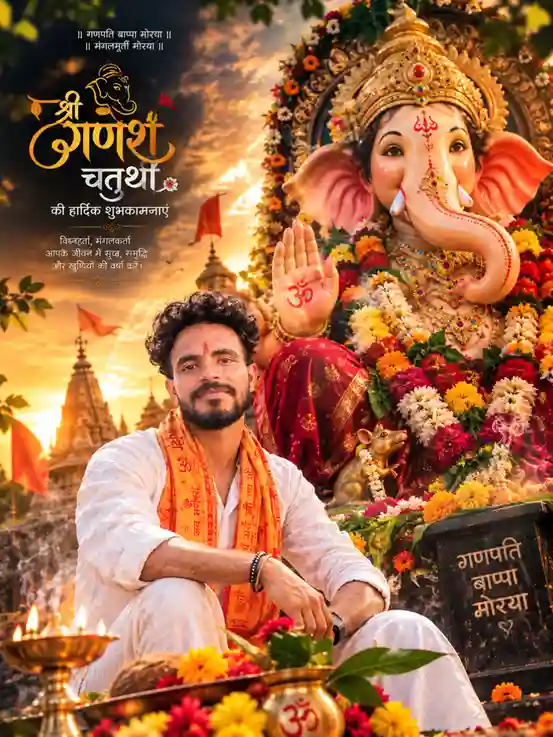
4. Cinematic Sunset Ganesh Portrait
Background mein dramatic golden sunset aur temple silhouettes hon.
Mood: Cinematic + Majestic
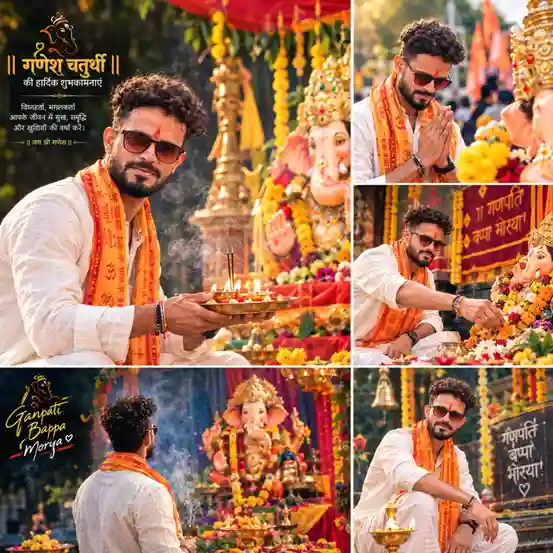
5. Four-Panel Ganesh Chaturthi Collage
Ek square collage mein four different devotional moments create kiye ja sakte hain:
- Ganesha ke saath sitting portrait
- Namaste pose
- Flower offering
- Rear-view devotional shot
Mood: Premium + Storytelling
AI Prompt Mein Negative Prompt Kyon Important Hai?
Negative prompt ka purpose unwanted visual problems ko reduce karne ki koshish karna hota hai.
Common problems:
- Face distortion
- Extra fingers
- Deformed hands
- Plastic skin
- Duplicate person
- Duplicate idol
- Blurry face
- Wrong anatomy
- Cartoon-like appearance
- Unwanted text
Isliye prompt ke end mein ek concise negative prompt useful ho sakta hai.
Lekin yahan bhi ek misconception hai: negative prompt koi magic error-correction system nahi hai. Agar composition hi overcomplicated hai, to 50 negative keywords add karne se result necessarily better nahi hoga.
AI Ganesh Chaturthi Photo Ko Realistic Kaise Banayein?
Realism ke liye sirf “4K” ya “ultra-realistic” repeatedly likhna enough nahi hai.
Better approach:
Natural Skin
“realistic skin pores, natural skin texture, subtle imperfections”
Realistic Lighting
“soft natural sunlight, realistic shadows, warm highlights”
Realistic Depth
“shallow depth of field, natural foreground bokeh”
Realistic Materials
“detailed fabric texture, realistic metal reflections, natural flowers”
Natural Face
“authentic facial proportions, realistic facial details”
Ye keywords overall visual realism ko direction dene mein help kar sakte hain.
4:5 Ya 1:1 — Kaunsa Format Choose Karein?
Platform ke according aspect ratio choose karna smart hai.
| Use Case | Recommended Ratio |
|---|---|
| Instagram Portrait | 4:5 |
| Festival Poster | 4:5 |
| WhatsApp Status | 9:16 |
| Instagram Story | 9:16 |
| Square Social Post | 1:1 |
| Four-Panel Collage | 1:1 |
Agar aap normal Ganesh Chaturthi greeting poster bana rahe hain, to 4:5 ek strong choice hai.
Agar target WhatsApp/Instagram Story hai, to 9:16 better option ho sakta hai.
Reference Photo Kaisi HonI Chahiye?
Identity-based editing ke liye reference photo ki quality matter karti hai.
Better results ke liye:
- Face clearly visible ho
- Image blurry na ho
- Face heavily filtered na ho
- Extreme side angle avoid karein
- Very dark photo avoid karein
- Hair aur beard reasonably visible ho
- Face kisi object se covered na ho
Ek clean portrait reference AI ko identity-related visual information dene ke liye generally better starting point deta hai.
Common Mistakes Jo AI Photo Prompt Banate Time Avoid Karni Chahiye
Mistake 1: Bahut Generic Prompt
“Make my photo Ganesh Chaturthi style.”
Ye bahut vague hai.
Better hai ki subject, outfit, idol, lighting, composition aur typography specify karein.
Mistake 2: Har Cheez Ek Saath Add Karna
Agar aap background mein:
10 idols + 50 diyas + huge crowd + temple + fireworks + flowers + multiple people
sab kuch daal denge, to composition messy ho sakti hai.
More details ≠ better image.
Mistake 3: Identity Instructions Ko Ignore Karna
Agar face consistency important hai, to reference photo aur identity instructions ko prompt ke beginning mein clearly define karna better hai.
Mistake 4: Typography Par Blind Trust
AI image generators text ko imperfectly render kar sakte hain.
Agar greeting ka exact spelling critical hai, final typography ko dedicated design tool mein add karna safer workflow hai.
Mistake 5: Sirf “4K” Likhe Rehna
“4K, 8K, ultra HD, masterpiece” ko repeat karne se prompt automatically professional nahi ho jata.
Composition + lighting + subject direction + realism + identity consistency ko priority dein.
Mobile Ke Liye Ganesh Chaturthi AI Prompt
Agar aap Instagram Story ya WhatsApp Status ke liye image create kar rahe hain, prompt ke end mein add karein:
Vertical 9:16 composition, subject centered in the lower-middle area, enough clean space in the upper section for festival greeting text, cinematic devotional atmosphere, mobile-friendly composition.
Isse composition ko vertical social-media format ke according direct kiya ja sakta hai.
Ganesh Chaturthi AI Photo Editing Ka Best Workflow
Ek practical workflow kuch is tarah ho sakta hai:
Step 1: Clear reference photo select karein.
Step 2: Desired festival concept decide karein.
Step 3: Main subject aur outfit define karein.
Step 4: Lord Ganesha idol aur decorations describe karein.
Step 5: Lighting aur atmosphere specify karein.
Step 6: Composition aur aspect ratio define karein.
Step 7: Identity consistency instructions add karein.
Step 8: Unwanted artifacts ke liye concise negative prompt add karein.
Step 9: Generated result ko inspect karein.
Step 10: Agar face, hands ya text mein problem ho, to targeted revision prompt use karein.
Ye last step important hai. Har baar completely new prompt likhna zaroori nahi. Problem identify karke targeted correction karna generally better workflow hai.
AI-Generated Ganesh Chaturthi Images Ko Kahan Use Kar Sakte Hain?
Aap apne generated festival visuals ko, applicable rights aur platform rules ko follow karte hue, different personal or promotional contexts mein use kar sakte hain:
- Instagram posts
- Instagram Stories
- Facebook posts
- WhatsApp status
- WhatsApp greetings
- Festival blog posts
- YouTube thumbnails
- Website banners
- Digital greeting cards
- Festival social-media campaigns
Commercial use se pehle jis AI tool ka use kar rahe hain, uski current licensing and usage terms check karna important hai.
FAQs
Ganesh Chaturthi AI photo editing prompt kya hota hai?
Ye ek detailed instruction hota hai jo AI ko batata hai ki reference photo ko Ganesh Chaturthi theme mein kis tarah transform karna hai.
Kya AI face ko exactly same rakhega?
Prompt identity preservation ko strongly instruct kar sakta hai, lekin exact identity preservation ki guarantee nahi hoti. Reference photo quality aur AI model ki capabilities bhi matter karti hain.
Ganesh Chaturthi poster ke liye best ratio kya hai?
Portrait festival poster ke liye 4:5 useful choice hai. Stories aur Status ke liye 9:16 zyada suitable hai.
Kya Hindi text AI image mein accurately aa jayega?
Ho sakta hai, lekin generated text mein spelling ya character errors aa sakte hain. Exact Hindi greeting ke liye post-generation text overlay safer option hai.
Kya traditional outfit zaroori hai?
Nahi. Aap traditional kurta-pajama ke saath modern festive outfit bhi use kar sakte hain. Prompt ka main purpose desired visual direction define karna hai.
Final Takeaway
Ganesh Chaturthi AI Photo Editing Prompts 2026 ka real advantage sirf “AI se photo banana” nahi hai. Strong result ka foundation ek well-structured prompt hai.
Ek professional prompt mein generally ye elements hone chahiye:
Reference Photo → Identity → Outfit → Ganesha Idol → Festival Environment → Lighting → Composition → Typography → Photography Style → Quality Control
Aur sabse important lesson ye hai ki prompt ko unnecessarily huge banana objective nahi hona chahiye. Clear instructions, strong composition aur realistic constraints ek bloated prompt se zyada valuable hain.
Agar aap Ganesh Chaturthi ke liye AI photo editing kar rahe hain, to alag-alag concepts—traditional puja, cinematic sunset, premium portrait, four-panel collage aur social-media poster—ke liye separate prompts banana better strategy hai.
Ganpati Bappa Morya! 🙏