Artificial Intelligence has changed the way we make pictures, like portraits, movie scenes, anime and product photos. Now we can make pictures in just a few seconds with the right words.
This big collection of Artificial Intelligence image prompts has over 2000 prompts in one place. It is one of the free collections of Artificial Intelligence prompts for people who make things, designers, marketers, photographers, bloggers and people who love Artificial Intelligence. These prompts work with all Artificial Intelligence image makers, like ChatGPT, Midjourney, Gemini, FLUX, Ideogram, Stable Diffusion, Grok and more.
We can use these prompts to make movie portraits, photos, anime, cyberpunk scenes, fashion pictures, luxury lifestyle pictures, product pictures, buildings, food photos, social media pictures, travel photos, cars, animals, video game ideas and a lot more. Just copy the prompt. Paste it into our favorite Artificial Intelligence image maker and it will make a great picture.
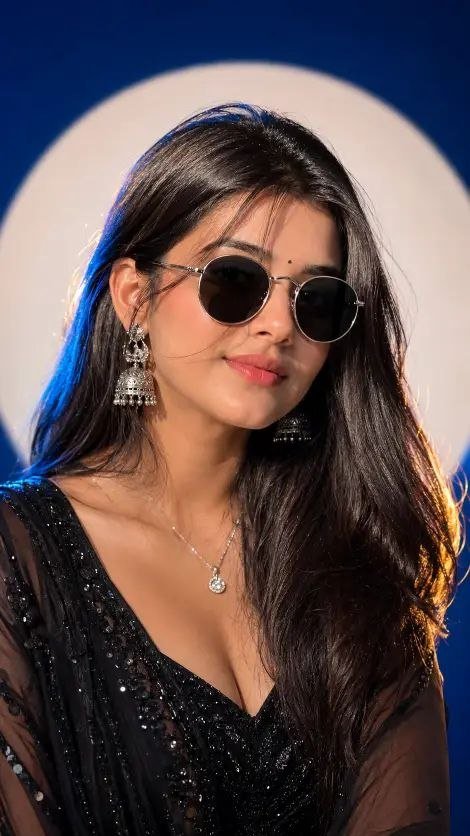
BLUE STUDIO PREMIUM PORTRAIT – WOMEN PROMPT 2
FINAL UNIVERSAL FEMALE PROMPT (Copy & Paste)
Use the uploaded reference image as the ONLY identity source. STRICT IDENTITY PRESERVATION. Preserve
100% of the woman’s facial identity, facial structure, hairstyle, eyebrows, eyes, nose, lips, jawline, ears, skin tone,
age, body proportions, and every unique facial feature. Do NOT beautify, replace, modify, or reinterpret the face.
Create an ultra-realistic premium cinematic studio portrait of the woman alone (no male, no extra people).
Camera Composition
Capture the subject in an extreme close-up portrait from the chest-up (head and upper torso only), filling 80-90%
of the frame, exactly like a luxury fashion editorial portrait. Eye-level camera angle, slight 3/4 head turn, DSLR
85mm prime lens, shallow depth of field, razor-sharp facial details, creamy background blur.
Sunglasses
Wear premium luxury round sunglasses with a thin polished silver metal frame, dark black lenses, minimalist
designer style, realistic reflections, perfectly fitted on the face, identical premium fashion look.
Background
Deep royal blue seamless studio backdrop with a large centered soft white circular spotlight behind the subject,
creating a dramatic halo effect. Clean luxury studio environment with no extra objects.
Lighting
Luxury fashion studio lighting featuring:
Large soft key light
Soft fill light
Blue rim light on one side
Warm golden rim light on the opposite side
Cinematic HDR lighting
Soft natural shadows
Glossy editorial finish
Realistic skin tones
Outfit
A premium elegant black evening gown or black sequin lehenga-style outfit with a modern luxury designer look,
subtle shimmer, perfectly tailored fit, sophisticated styling, paired with a delicate silver pendant necklace and
matching elegant earrings.
Hair & Makeup
Soft glossy hair with natural volume, flawless yet realistic makeup, soft matte finish, subtle nude lipstick, defined
eyes, luxury editorial beauty styling.
Expression & Pose
Relaxed confident expression with a gentle smile, head slightly tilted, shoulders relaxed, naturally facing slightly
off-camera, premium magazine cover pose.
Quality
Hyper-realistic, photorealistic, luxury editorial fashion photography, premium studio portrait, cinematic color
grading, HDR, ultra-detailed skin texture, 16K Ultra HD, masterpiece quality, natural colors, no watermark, no
text, no extra people, 9:16 vertical composition
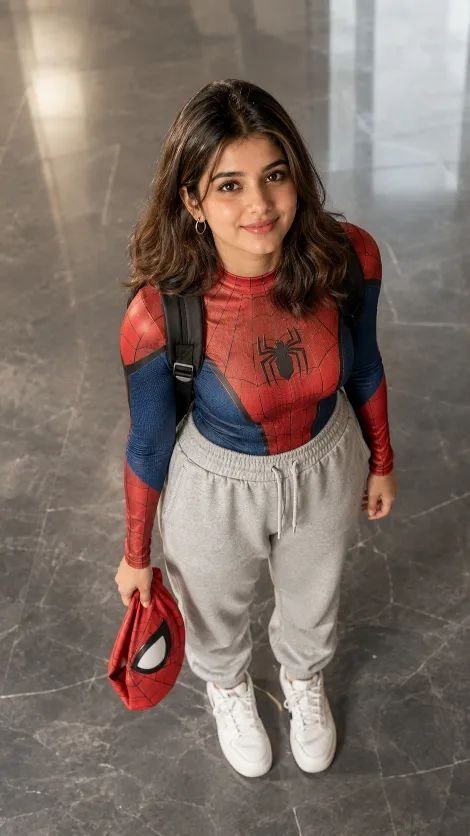
Ultra-realistic cinematic portrait of a young South Asian woman standing indoors on a polished gray marble floor, viewed from a high-angle top-down perspective as if photographed from an upper floor. She is looking directly into the camera with a warm, gentle smile and expressive dark brown eyes. She has shoulder-length wavy light-brown hair with a center part, natural glowing skin, subtle makeup, and small silver hoop earrings. She is wearing a fitted red-and-blue Spider-Man-inspired compression top with a realistic web pattern and spider emblem, light gray oversized jogger sweatpants with drawstrings, clean white sneakers, and a black backpack over both shoulders. In her right hand, she is casually holding a red Spider-Man mask. The setting is a modern indoor lobby with large polished marble tiles, soft ambient lighting, and a clean minimalist background. The composition is centered with full-body framing, natural body proportions, realistic textures, soft cinematic color grading, shallow depth of field, ultra-detailed skin, sharp facial focus, 85mm lens look, HDR, photorealistic, high dynamic range, premium DSLR quality, 8K, highly detailed, Instagram lifestyle photography, natural lighting, editorial fashion style, no watermark, no text.
Negative Prompt:
low quality, blurry, deformed face, extra fingers, bad anatomy, duplicate limbs, cartoon, CGI, oversaturated, noisy, watermark, logo, text, cropped feet, distorted eyes, unrealistic skin, low resolution, artifacts.
Use the uploaded reference image as the ONLY identity reference. Preserve the person’s exact facial identity, face shape, jawline, nose, lips, eyes, eyebrows, skin tone, hairstyle, hairline, body proportions, and overall appearance with absolute accuracy. Do not beautify or modify the identity.
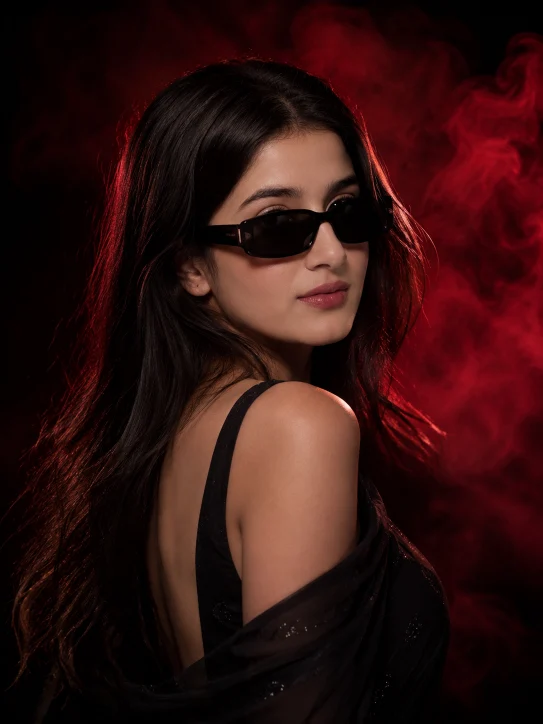
Create a luxury fashion editorial portrait with a bold, mysterious, high-end cinematic aesthetic.
The subject wears an elegant all-black outfit, styled according to the person’s gender:
Female: premium black saree with subtle shimmer, black sleeveless blouse or elegant black layered blazer, minimalist luxury styling.
Male: premium black blazer layered over a black crew-neck t-shirt or black shirt.
Accessories:
Premium glossy black rectangular sunglasses
Minimal luxury necklace
Elegant earrings (female)
Minimal luxury watch or ring (male optional)
Hair: Natural healthy hair with realistic volume and soft movement. Every generation should create a slightly different hairstyle while preserving the person’s identity.
Expression: Neutral confident expression, relaxed lips, luxury model attitude, mysterious gaze, no exaggerated smile.
Pose: Random premium fashion poses every generation:
Looking slightly sideways
Looking toward camera
Three-quarter angle
Over-the-shoulder
Folded arms
One hand touching hair
Relaxed posture
Editorial standing pose
Background: Deep black seamless studio background with dramatic dark crimson smoke. Dense red volumetric smoke behind the subject creating depth. Every generation should randomize the smoke pattern while maintaining the same luxury atmosphere.
Lighting: Professional Hollywood fashion lighting.
Large softbox key light
Deep cinematic shadows
Strong saturated crimson rim light behind the hair and shoulders
Soft fill light
Warm skin tones
Realistic eye reflections
Premium contrast
Glossy hair highlights
Camera: Sony A7R V
85mm GM Lens
f/1.4
Eye-level
Waist-up portrait
Centered editorial composition
Rendering: Ultra-photorealistic, 8K HDR, Vogue magazine cover quality, luxury fashion campaign, Unreal Engine 5, Octane Render, ray tracing, global illumination, realistic skin pores, ultra-detailed hair strands, premium fabric texture, cinematic color grading, shallow depth of field, creamy bokeh, maximum realism.
Random Variation Rules
Every generation should automatically randomize:
Hairstyle
Head tilt
Camera crop
Pose
Red smoke pattern
Rim light intensity
Hair movement
Body angle
Background depth
Sunglasses angle
while keeping the same premium fashion style and preserving the person’s identity.
Negative Prompt
cartoon, anime, CGI, plastic skin, low quality, blurry face, distorted anatomy, extra fingers, duplicate face, oversaturated colors, watermark, text, logo, AI artifacts, flat lighting, smiling teeth, unrealistic shadows, overexposed highlights, low resolution, deformed sunglasses, messy composition.
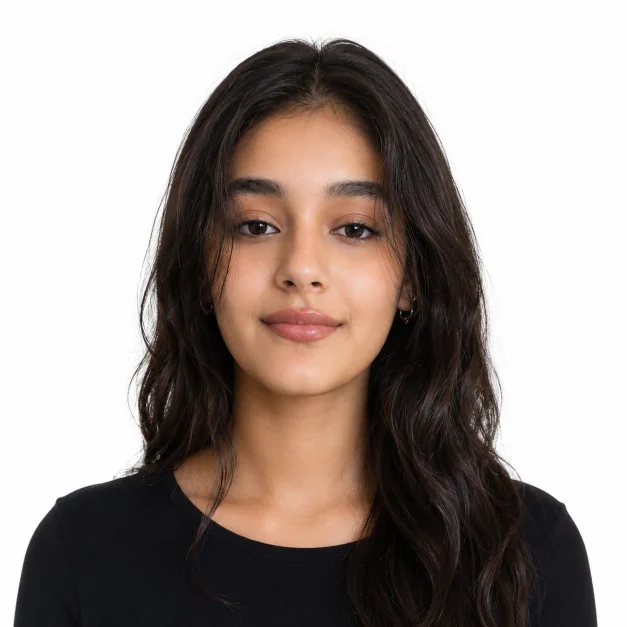
Create an ultra-realistic passport-size portrait using the provided reference image, ensuring the facial features remain identical with zero modification. The face must match exactly, preserving skin tone, structure, and all natural details. The subject should wear a clean white collared shirt with a modern branded style. Maintain a neutral closed-lip smile with a straight forward gaze. The head must be upright, neck not tilted or bent, and shoulders perfectly straight and level. Both ears clearly visible and properly aligned, with eyes balanced and positioned evenly. Center the face with proper passport framing including shoulders. Use soft even studio lighting, plain light background, sharp focus, realistic skin texture, and natural colors. No face changes, no stylization, no filters, no artistic effects, no distortion.
Whether we are just starting to make Artificial Intelligence pictures and want to try prompts or we are experienced makers looking for new ideas this collection of Artificial Intelligence prompts will help us make amazing pictures in just a few seconds.
MASTER IMAGE GENERATION PROMPT (STRICT IDENTITY LOCK)
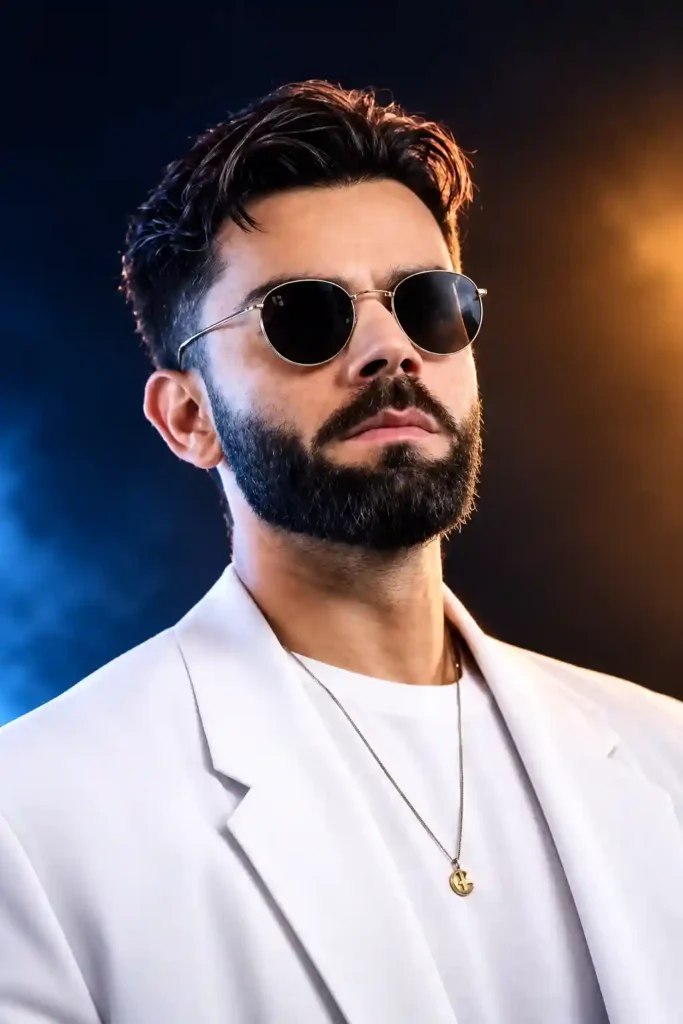
Use the uploaded reference image as the EXACT identity of the person. STRICT IDENTITY LOCK (HIGHEST PRIORITY) Preserve 100% of the person’s facial identity, facial structure, face shape, forehead, eyebrows, eyes, eyelashes, nose, lips, jawline, ears, skin tone, skin texture, pores, beard, moustache, hairstyle, hairline, age, expression, facial proportions, and every unique facial characteristic exactly as in the uploaded reference image. Do NOT beautify, regenerate, alter, replace, reshape, or modify the face in any way. Maintain the exact identity while only recreating the cinematic photography style. SCENE: Premium luxury studio portrait with a clean dark black background fading into deep navy blue. Soft atmospheric haze with subtle cinematic depth. No text, watermark, logo, graphics, or additional objects. POSE: Head turned approximately 30-40° to the left, chin slightly raised, confident expression, looking upward into the distance. Natural relaxed shoulders. Portrait framed from the upper chest upward. OUTFIT: Premium luxury white tailored blazer. White premium crew-neck t-shirt. Thin gold chain necklace with a small elegant circular pendant. Keep the outfit clean, luxurious, and wrinkle-free. SUNGLASSES: Round premium metal-frame sunglasses with thin gold rims and dark black lenses. Perfectly centered, symmetrical, realistic reflections, luxury fashion look. HAIR: Naturally styled with high volume and textured layers, soft cinematic movement, realistic individual hair strands with detailed edge lighting. LIGHTING: Professional Hollywood three-point cinematic lighting. • Strong warm golden rim light from the rear right creating a glowing outline around the hair and shoulders. • Deep electric blue fill light illuminating the lower face, jawline, neck, and blazer. • Soft warm key light from the front-left with smooth skin gradients. • Natural catchlights and realistic light falloff. • High dynamic range with balanced highlights and shadows. COLOR GRADING: Premium teal and orange cinematic grading with rich warm gold highlights, deep blue shadows, high contrast, realistic skin tones, luxurious editorial finish. CAMERA: Sony A7R V 85mm GM Prime Lens f/1.8 ISO 100 1/250 sec Eye Autofocus Shallow Depth of Field True optical bokeh QUALITY: Ultra photorealistic, luxury editorial photography, Hollywood cinematic portrait, DSLR realism, natural skin texture, visible pores, ultra-sharp eyes, extremely detailed beard and hair, realistic fabric texture, HDR, global illumination, ray-traced lighting, physicallyaccurate reflections, volumetric lighting, soft bloom, professional color science, masterpiece, award-winning portrait photography, hyper-detailed, ultra realistic, 16K Ultra HD quality. 9:16 aspect ratio.
MASTER IMAGE GENERATION PROMPT (STRICT IDENTITY LOCK)
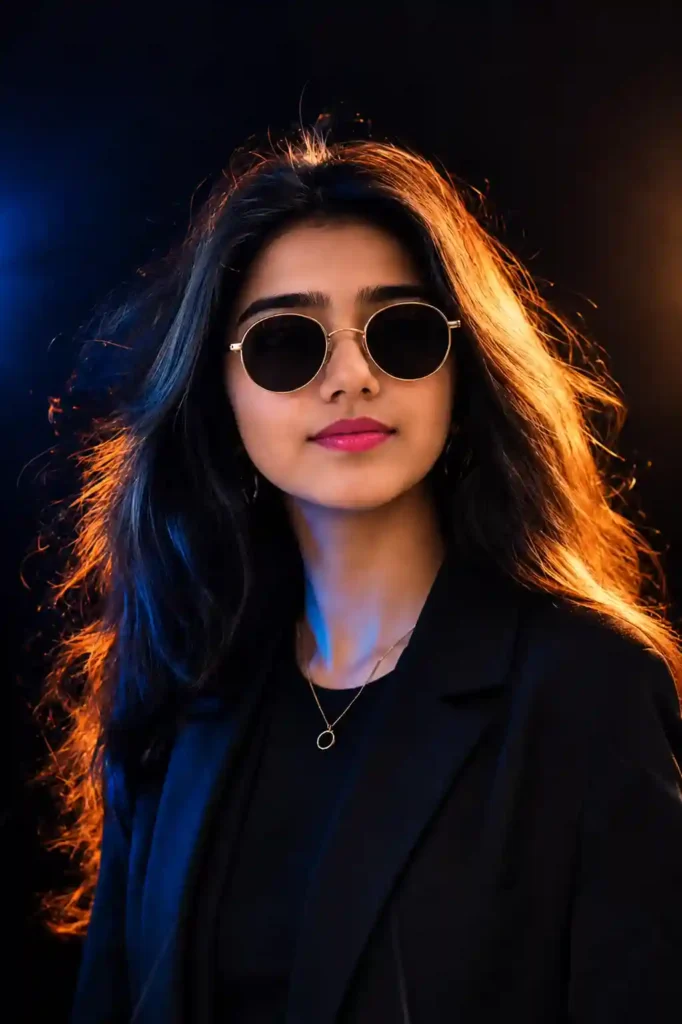
PROMPT Use the uploaded reference image as the EXACT identity of the person. STRICT IDENTITY LOCK (HIGHEST PRIORITY) Preserve 100% of the person’s facial identity, facial structure, face shape, forehead, eyebrows, eyes, eyelashes, nose, lips, jawline, ears, skin tone, skin texture, pores, beard, moustache, hairstyle, hairline, age, expression, facial proportions, and every unique facial characteristic exactly as in the uploaded reference image. Do NOT beautify, regenerate, alter, replace, reshape, or modify the face in any way. Maintain the exact identity while only recreating the cinematic photography style. SCENE: Premium luxury studio portrait with a clean dark black background fading into deep navy blue. Soft atmospheric haze with subtle cinematic depth. No text, watermark, logo, graphics, or additional objects. POSE: Head turned approximately 30-40° to the left, chin slightly raised, confident expression, looking upward into the distance. Natural relaxed shoulders. Portrait framed from the upper chest upward. OUTFIT: Premium matte black blazer over a black crew-neck t-shirt. Thin gold chain necklace with a small elegant circular pendant. Keep the outfit clean, luxurious, and wrinkle-free. SUNGLASSES: Round premium metal-frame sunglasses with thin gold rims and dark black lenses. Perfectly centered, symmetrical, realistic reflections, luxury fashion look. HAIR: Naturally styled with high volume and textured layers, soft cinematic movement, realistic individual hair strands with detailed edge lighting. LIGHTING: Professional Hollywood three-point cinematic lighting. Strong warm golden rim light from the rear right creating a glowing outline around the hair and shoulders. Deep electric blue fill light illuminating the lower face, jawline, neck, and blazer. Soft warm key light from the front-left with smooth skin gradients. Natural catchlights and realistic light falloff. High dynamic range with balanced highlights and shadows. COLOR GRADING: Premium teal and orange cinematic grading with rich warm gold highlights, deep blue shadows, high contrast, realistic skin tones, luxurious editorial finish. CAMERA: Sony A7R V 85mm G
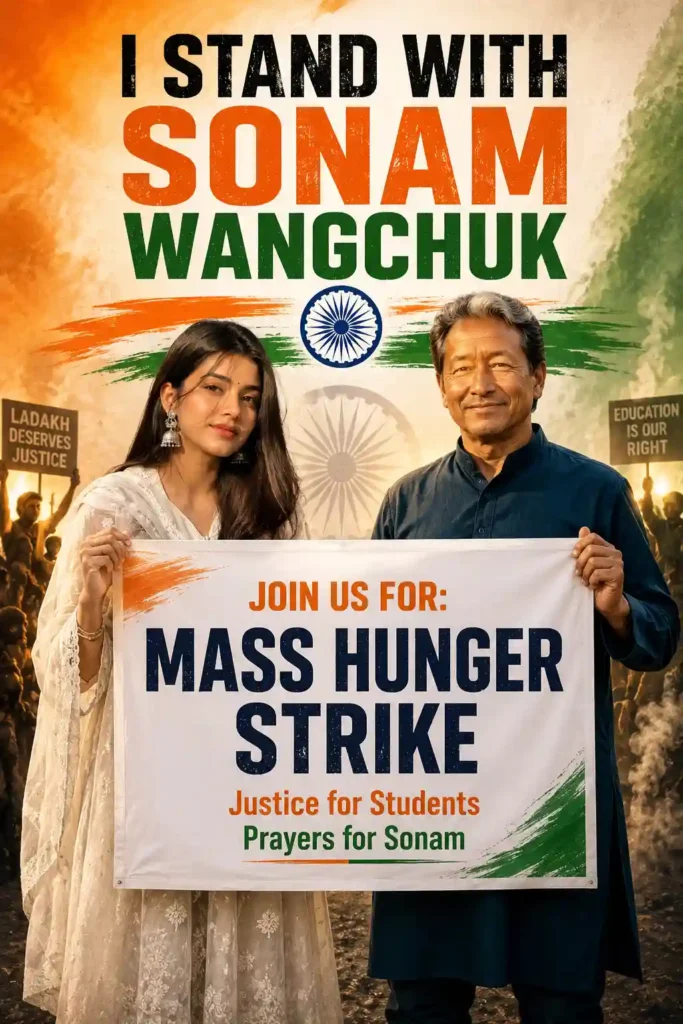
Universal Identity-Preserved Protest Poster Prompt (Male & Female)
Use the uploaded reference image as the ONLY identity reference.
Preserve the person’s identity with absolute accuracy. Do NOT change, beautify, replace, enhance, or regenerate the face. Keep the exact facial structure, jawline, cheeks, nose shape, lips, eyes, eyebrows, forehead, ears, hairstyle, hairline, skin tone, facial proportions, age appearance, expression, and overall identity exactly the same as the uploaded image. The final person must be instantly recognizable as the uploaded individual.
Gender Rule:
If the uploaded reference is male, generate the same male.
If the uploaded reference is female, generate the same female.
Never swap gender or alter masculine/feminine facial characteristics.
—
Scene
Create a premium ultra-realistic 2:3 vertical protest poster.
On the left, Sonam Wangchuk stands confidently wearing a navy blue kurta, smiling calmly.
On the right, place the person from the uploaded reference image with 100% preserved identity.
The uploaded person is standing confidently beside Sonam Wangchuk while smiling naturally and giving a thumbs-up toward the camera.
Both are holding a large protest banner together.
—
Clothing Rule
Maintain the uploaded person’s gender while changing only the outfit to a clean modern casual style.
If Male: Cream oversized striped shirt, black pants, clean white sneakers.
If Female: Cream oversized striped shirt (or oversized cream shirt), black pants, clean white sneakers.
Keep realistic body proportions without exaggeration.
—
Poster Title
At the top, add bold distressed typography:
I STAND WITH SONAM WANGCHUK
Large uppercase lettering.
—
Background
Indian tricolor theme using:
Saffron
White
Green
Include
textured patriotic background
Ashoka Chakra below the title
saffron and green brush strokes extending horizontally
realistic Indian flag textures
patriotic smoke
cinematic volumetric lighting
subtle faded Ashoka Chakra behind protesters
—
Protest Banner
White banner with Indian tricolor accents.
Text:
JOIN US FOR: MASS HUNGER STRIKE
Justice for Students
Prayers for Sonam
Use bold, clean typography.
—
Background Crowd
Include silhouettes of peaceful protesters holding placards.
Realistic Indian flags waving.
Inspirational patriotic atmosphere.
—
Image Quality
Ultra photorealistic
100% identity preservation
Magazine-quality political campaign poster
Professional composition
Premium HDR
Ultra-sharp focus
Natural skin texture
Realistic eyes
Realistic hands
Realistic clothing folds
Natural shadows
Accurate perspective
Cinematic lighting
Premium depth of field
High contrast
Rich colors
8K quality
Professional social media poster
Hyper detailed
Photorealistic
Ultra realistic
—
Identity Preservation Priority
The uploaded reference image has the highest priority.
Do NOT modify:
Face
Hair
Skin tone
Facial proportions
Identity
Expression
Eye shape
Nose
Lips
Jawline
Forehead
Ears
Only change the pose, outfit, and background according to this prompt while keeping the person’s identity completely intact.
—
Negative Prompt
Blurry, low resolution, distorted face, identity change, different person, gender swap, beautified face, AI-generated facial features, extra fingers, bad anatomy, duplicated people, cropped body, incorrect pose, deformed hands, unrealistic smile, poor typography, text glitches, watermark, logo, CGI look, cartoon style, plastic skin, noisy image, oversaturated colors, incorrect Indian flag colors, artifacts, motion blur, low-quality rendering, unrealistic lighting, poorly rendered eyes, poorly rendered hands, incorrect clothing folds, bad composition.
AI image prompts are descriptions that tell an AI what picture to make.
The the description the better the picture will be.
For example of saying “a cat” you could say “a very real looking golden cat sitting by a window with rain outside with movie style lighting and a special camera lens and very detailed fur in very high quality”.
This description gives the AI a lot information so it can make a much better picture.
Why use AI image prompts?
Using descriptions has a lot of advantages.
You can make looking pictures in just a few seconds.
You can save a lot of time editing pictures.
Your pictures will look better.
You will get the results every time.
You can make art.
You can be more creative.
You can make pictures that look like they were made by a professional.
You can make pictures for media quickly.
You can make looking graphics.
You can try out art styles.
What is in this collection?
This collection has than 2,000 AI image prompts in many different categories.
Some popular categories are:
Portraits
Realistic Photography
Fashion Photography
Luxury Lifestyle
Fantasy Art
Cyberpunk Scenes
Anime Characters
Studio Portraits
Architecture
Travel Photography
Nature Landscapes
Wildlife
Food Photography
Product Photography
Car Photography
Motorcycle Photography
Interior Design
Space Exploration
Historical Art
Medieval Kingdoms
Fantasy Creatures
YouTube Thumbnails
Instagram Posts
Wallpapers
Gaming Characters
AI Influencers
Wedding Photography
Street Photography
Editorial Photography
Minimalist Art
Digital Painting
Double Exposure
Surreal Art
Seasonal Themes
Festival Designs
Business Branding
Social Media Content
Advertising Posters
Logo Inspiration
Character Design
Concept Art
Many more creative styles.
Which AI image generators can I use these prompts with?
You can use these prompts with modern AI image generation tools, including:
ChatGPT Image Generator
Midjourney
Gemini
FLUX
Ideogram
Stable Diffusion
Grok
Leonardo AI
Adobe Firefly
Microsoft Designer
DreamStudio
Playground AI
Mage Space
NightCafe
Bing Image Creator
Most prompts work without changing anything but you can add your own details to make them even better.
How do I use these AI image prompts?
Using the prompts is very easy.
Step 1: Look through the collection. Choose a prompt that matches the kind of picture you want.
Step 2: Click the Copy Prompt button. Copy the prompt by hand.
Step 3: Open your AI image generator.
Step 4: Paste the prompt into the text box.
Step 5: Change the prompt if you need to by changing things like:
the subject
the clothing
the background
the camera angle
the lighting
the weather
the mood
the colors
the art style
the shape of the picture
Step 6: Click Generate. In a few seconds the AI will make your picture. Tips for results: To make higher quality pictures follow these tips: Use detailed descriptions. Say what angle the camera is at. Say what the lighting is like. Include information about the camera lens. Add keywords about the picture quality. Say what style of art it is. Say what the environment is like. Include emotions or expressions. Describe the colors clearly. Use prompts when you can. Good keywords to use: You can make any prompt better by adding keywords like: Ultra Realistic Photorealistic 8K HDR DSLR Photography Magazine Quality Ultra Detailed Cinematic Lighting Professional Photography Soft Lighting Natural Skin Texture Sharp Focus High Dynamic Range Realistic Shadows Volumetric Lighting Who can use these prompts? This collection is perfect for: Bloggers Graphic Designers YouTubers Digital Marketers Social Media Managers Freelancers Photographers Students Businesses AI Artists Content Creators Print-on-Demand Sellers E-commerce Store Owners Website Designers Advertising Agencies ways to use AI images: The pictures you make can be used for: Blog featured images Instagram posts Facebook graphics Pinterest pins YouTube thumbnails Website banners Product mockups Digital marketing Advertisements Posters Wallpapers Book covers Presentation slides Portfolio projects Print designs inspiration Always make sure you are allowed to use the pictures for what you want according to the rules of the AI platform you use.
FAQ:
Are these prompts free?
Yes you can. Use the prompts for your own projects as long as you follow the rules of the AI platform you use.
Do these prompts work with ChatGPT?
Yes they are designed to work with ChatGPTs image generation and many other AI image generators.
Can I change the prompts?
Yes you can change the subject, colors, lighting, camera settings, style or any other detail to match your vision.
Do I need to know how to write prompts?
No beginners can just. Paste the prompts and advanced users can change them to make them even better.
Why do different AI tools make pictures?
Each AI model is trained differently and interprets prompts in its way so the same prompt may make slightly different pictures on different platforms.
Final Thoughts:
Finding good AI image prompts can take a time but this collection has everything in one place. With over 2,000 organized prompts you will have inspiration for almost every creative project, from real looking portraits and fantasy artwork to product photography, travel scenes, anime characters, social media content and professional marketing visuals.
Whether you are making pictures, for a blog YouTube channel, online business, portfolio or just exploring the world of AI art these prompts can help you achieve results faster. Bookmark this page look at categories try out new styles and keep coming back as new prompts are added to the collection.
3 thoughts on “2000+ AI Viral Image Prompts Copy, Paste & Generate Stunning AI Images”
BLUE STUDIO PREMIUM PORTRAIT – WOMEN PROMPT 2
FINAL UNIVERSAL FEMALE PROMPT (Copy & Paste)
Use the uploaded reference image as the ONLY identity source. STRICT IDENTITY PRESERVATION. Preserve
100% of the woman’s facial identity, facial structure, hairstyle, eyebrows, eyes, nose, lips, jawline, ears, skin tone,
age, body proportions, and every unique facial feature. Do NOT beautify, replace, modify, or reinterpret the face.
Create an ultra-realistic premium cinematic studio portrait of the woman alone (no male, no extra people).
Camera Composition
Capture the subject in an extreme close-up portrait from the chest-up (head and upper torso only), filling 80-90%
of the frame, exactly like a luxury fashion editorial portrait. Eye-level camera angle, slight 3/4 head turn, DSLR
85mm prime lens, shallow depth of field, razor-sharp facial details, creamy background blur.
Sunglasses
Wear premium luxury round sunglasses with a thin polished silver metal frame, dark black lenses, minimalist
designer style, realistic reflections, perfectly fitted on the face, identical premium fashion look.
Background
Deep royal blue seamless studio backdrop with a large centered soft white circular spotlight behind the subject,
creating a dramatic halo effect. Clean luxury studio environment with no extra objects.
Lighting
Luxury fashion studio lighting featuring:
Large soft key light
Soft fill light
Blue rim light on one side
Warm golden rim light on the opposite side
Cinematic HDR lighting
Soft natural shadows
Glossy editorial finish
Realistic skin tones
Outfit
A premium elegant black evening gown or black sequin lehenga-style outfit with a modern luxury designer look,
subtle shimmer, perfectly tailored fit, sophisticated styling, paired with a delicate silver pendant necklace and
matching elegant earrings.
Hair & Makeup
Soft glossy hair with natural volume, flawless yet realistic makeup, soft matte finish, subtle nude lipstick, defined
eyes, luxury editorial beauty styling.
Expression & Pose
Relaxed confident expression with a gentle smile, head slightly tilted, shoulders relaxed, naturally facing slightly
off-camera, premium magazine cover pose.
Quality
Hyper-realistic, photorealistic, luxury editorial fashion photography, premium studio portrait, cinematic color
grading, HDR, ultra-detailed skin texture, 16K Ultra HD, masterpiece quality, natural colors, no watermark, no
text, no extra people, 9:16 vertical composition
BLUE STUDIO PREMIUM PORTRAIT – WOMEN PROMPT 2
FINAL UNIVERSAL FEMALE PROMPT (Copy & Paste)
Use the uploaded reference image as the ONLY identity source. STRICT IDENTITY PRESERVATION. Preserve
100% of the woman’s facial identity, facial structure, hairstyle, eyebrows, eyes, nose, lips, jawline, ears, skin tone,
age, body proportions, and every unique facial feature. Do NOT beautify, replace, modify, or reinterpret the face.
Create an ultra-realistic premium cinematic studio portrait of the woman alone (no male, no extra people).
Camera Composition
Capture the subject in an extreme close-up portrait from the chest-up (head and upper torso only), filling 80-90%
of the frame, exactly like a luxury fashion editorial portrait. Eye-level camera angle, slight 3/4 head turn, DSLR
85mm prime lens, shallow depth of field, razor-sharp facial details, creamy background blur.
Sunglasses
Wear premium luxury round sunglasses with a thin polished silver metal frame, dark black lenses, minimalist
designer style, realistic reflections, perfectly fitted on the face, identical premium fashion look.
Background
Deep royal blue seamless studio backdrop with a large centered soft white circular spotlight behind the subject,
creating a dramatic halo effect. Clean luxury studio environment with no extra objects.
Lighting
Luxury fashion studio lighting featuring:
Large soft key light
Soft fill light
Blue rim light on one side
Warm golden rim light on the opposite side
Cinematic HDR lighting
Soft natural shadows
Glossy editorial finish
Realistic skin tones
Outfit
A premium elegant black evening gown or black sequin lehenga-style outfit with a modern luxury designer look,
subtle shimmer, perfectly tailored fit, sophisticated styling, paired with a delicate silver pendant necklace and
matching elegant earrings.
Hair & Makeup
Soft glossy hair with natural volume, flawless yet realistic makeup, soft matte finish, subtle nude lipstick, defined
eyes, luxury editorial beauty styling.
Expression & Pose
Relaxed confident expression with a gentle smile, head slightly tilted, shoulders relaxed, naturally facing slightly
off-camera, premium magazine cover pose.
Quality
Hyper-realistic, photorealistic, luxury editorial fashion photography, premium studio portrait, cinematic color
grading, HDR, ultra-detailed skin texture, 16K Ultra HD, masterpiece quality, natural colors, no watermark, no
text, no extra people, 9:16 vertical composition
BLUE STUDIO PREMIUM PORTRAIT – WOMEN PROMPT 2
FINAL UNIVERSAL FEMALE PROMPT (Copy & Paste)
Use the uploaded reference image as the ONLY identity source. STRICT IDENTITY PRESERVATION. Preserve
100% of the woman’s facial identity, facial structure, hairstyle, eyebrows, eyes, nose, lips, jawline, ears, skin tone,
age, body proportions, and every unique facial feature. Do NOT beautify, replace, modify, or reinterpret the face.
Create an ultra-realistic premium cinematic studio portrait of the woman alone (no male, no extra people).
Camera Composition
Capture the subject in an extreme close-up portrait from the chest-up (head and upper torso only), filling 80-90%
of the frame, exactly like a luxury fashion editorial portrait. Eye-level camera angle, slight 3/4 head turn, DSLR
85mm prime lens, shallow depth of field, razor-sharp facial details, creamy background blur.
Sunglasses
Wear premium luxury round sunglasses with a thin polished silver metal frame, dark black lenses, minimalist
designer style, realistic reflections, perfectly fitted on the face, identical premium fashion look.
Background
Deep royal blue seamless studio backdrop with a large centered soft white circular spotlight behind the subject,
creating a dramatic halo effect. Clean luxury studio environment with no extra objects.
Lighting
Luxury fashion studio lighting featuring:
Large soft key light
Soft fill light
Blue rim light on one side
Warm golden rim light on the opposite side
Cinematic HDR lighting
Soft natural shadows
Glossy editorial finish
Realistic skin tones
Outfit
A premium elegant black evening gown or black sequin lehenga-style outfit with a modern luxury designer look,
subtle shimmer, perfectly tailored fit, sophisticated styling, paired with a delicate silver pendant necklace and
matching elegant earrings.
Hair & Makeup
Soft glossy hair with natural volume, flawless yet realistic makeup, soft matte finish, subtle nude lipstick, defined
eyes, luxury editorial beauty styling.
Expression & Pose
Relaxed confident expression with a gentle smile, head slightly tilted, shoulders relaxed, naturally facing slightly
off-camera, premium magazine cover pose.
Quality
Hyper-realistic, photorealistic, luxury editorial fashion photography, premium studio portrait, cinematic color
grading, HDR, ultra-detailed skin texture, 16K Ultra HD, masterpiece quality, natural colors, no watermark, no
text, no extra people, 9:16 vertical composition
BLUE STUDIO PREMIUM PORTRAIT – WOMEN PROMPT 2
FINAL UNIVERSAL FEMALE PROMPT (Copy & Paste)
Use the uploaded reference image as the ONLY identity source. STRICT IDENTITY PRESERVATION. Preserve
100% of the woman’s facial identity, facial structure, hairstyle, eyebrows, eyes, nose, lips, jawline, ears, skin tone,
age, body proportions, and every unique facial feature. Do NOT beautify, replace, modify, or reinterpret the face.
Create an ultra-realistic premium cinematic studio portrait of the woman alone (no male, no extra people).
Camera Composition
Capture the subject in an extreme close-up portrait from the chest-up (head and upper torso only), filling 80-90%
of the frame, exactly like a luxury fashion editorial portrait. Eye-level camera angle, slight 3/4 head turn, DSLR
85mm prime lens, shallow depth of field, razor-sharp facial details, creamy background blur.
Sunglasses
Wear premium luxury round sunglasses with a thin polished silver metal frame, dark black lenses, minimalist
designer style, realistic reflections, perfectly fitted on the face, identical premium fashion look.
Background
Deep royal blue seamless studio backdrop with a large centered soft white circular spotlight behind the subject,
creating a dramatic halo effect. Clean luxury studio environment with no extra objects.
Lighting
Luxury fashion studio lighting featuring:
Large soft key light
Soft fill light
Blue rim light on one side
Warm golden rim light on the opposite side
Cinematic HDR lighting
Soft natural shadows
Glossy editorial finish
Realistic skin tones
Outfit
A premium elegant black evening gown or black sequin lehenga-style outfit with a modern luxury designer look,
subtle shimmer, perfectly tailored fit, sophisticated styling, paired with a delicate silver pendant necklace and
matching elegant earrings.
Hair & Makeup
Soft glossy hair with natural volume, flawless yet realistic makeup, soft matte finish, subtle nude lipstick, defined
eyes, luxury editorial beauty styling.
Expression & Pose
Relaxed confident expression with a gentle smile, head slightly tilted, shoulders relaxed, naturally facing slightly
off-camera, premium magazine cover pose.
Quality
Hyper-realistic, photorealistic, luxury editorial fashion photography, premium studio portrait, cinematic color
grading, HDR, ultra-detailed skin texture, 16K Ultra HD, masterpiece quality, natural colors, no watermark, no
text, no extra people, 9:16 vertical composition
BLUE STUDIO PREMIUM PORTRAIT – WOMEN PROMPT 2
FINAL UNIVERSAL FEMALE PROMPT (Copy & Paste)
Use the uploaded reference image as the ONLY identity source. STRICT IDENTITY PRESERVATION. Preserve
100% of the woman’s facial identity, facial structure, hairstyle, eyebrows, eyes, nose, lips, jawline, ears, skin tone,
age, body proportions, and every unique facial feature. Do NOT beautify, replace, modify, or reinterpret the face.
Create an ultra-realistic premium cinematic studio portrait of the woman alone (no male, no extra people).
Camera Composition
Capture the subject in an extreme close-up portrait from the chest-up (head and upper torso only), filling 80-90%
of the frame, exactly like a luxury fashion editorial portrait. Eye-level camera angle, slight 3/4 head turn, DSLR
85mm prime lens, shallow depth of field, razor-sharp facial details, creamy background blur.
Sunglasses
Wear premium luxury round sunglasses with a thin polished silver metal frame, dark black lenses, minimalist
designer style, realistic reflections, perfectly fitted on the face, identical premium fashion look.
Background
Deep royal blue seamless studio backdrop with a large centered soft white circular spotlight behind the subject,
creating a dramatic halo effect. Clean luxury studio environment with no extra objects.
Lighting
Luxury fashion studio lighting featuring:
Large soft key light
Soft fill light
Blue rim light on one side
Warm golden rim light on the opposite side
Cinematic HDR lighting
Soft natural shadows
Glossy editorial finish
Realistic skin tones
Outfit
A premium elegant black evening gown or black sequin lehenga-style outfit with a modern luxury designer look,
subtle shimmer, perfectly tailored fit, sophisticated styling, paired with a delicate silver pendant necklace and
matching elegant earrings.
Hair & Makeup
Soft glossy hair with natural volume, flawless yet realistic makeup, soft matte finish, subtle nude lipstick, defined
eyes, luxury editorial beauty styling.
Expression & Pose
Relaxed confident expression with a gentle smile, head slightly tilted, shoulders relaxed, naturally facing slightly
off-camera, premium magazine cover pose.
Quality
Hyper-realistic, photorealistic, luxury editorial fashion photography, premium studio portrait, cinematic color
grading, HDR, ultra-detailed skin texture, 16K Ultra HD, masterpiece quality, natural colors, no watermark, no
text, no extra people, 9:16 vertical composition
BLUE STUDIO PREMIUM PORTRAIT – WOMEN PROMPT 2
FINAL UNIVERSAL FEMALE PROMPT (Copy & Paste)
Use the uploaded reference image as the ONLY identity source. STRICT IDENTITY PRESERVATION. Preserve
100% of the woman’s facial identity, facial structure, hairstyle, eyebrows, eyes, nose, lips, jawline, ears, skin tone,
age, body proportions, and every unique facial feature. Do NOT beautify, replace, modify, or reinterpret the face.
Create an ultra-realistic premium cinematic studio portrait of the woman alone (no male, no extra people).
Camera Composition
Capture the subject in an extreme close-up portrait from the chest-up (head and upper torso only), filling 80-90%
of the frame, exactly like a luxury fashion editorial portrait. Eye-level camera angle, slight 3/4 head turn, DSLR
85mm prime lens, shallow depth of field, razor-sharp facial details, creamy background blur.
Sunglasses
Wear premium luxury round sunglasses with a thin polished silver metal frame, dark black lenses, minimalist
designer style, realistic reflections, perfectly fitted on the face, identical premium fashion look.
Background
Deep royal blue seamless studio backdrop with a large centered soft white circular spotlight behind the subject,
creating a dramatic halo effect. Clean luxury studio environment with no extra objects.
Lighting
Luxury fashion studio lighting featuring:
Large soft key light
Soft fill light
Blue rim light on one side
Warm golden rim light on the opposite side
Cinematic HDR lighting
Soft natural shadows
Glossy editorial finish
Realistic skin tones
Outfit
A premium elegant black evening gown or black sequin lehenga-style outfit with a modern luxury designer look,
subtle shimmer, perfectly tailored fit, sophisticated styling, paired with a delicate silver pendant necklace and
matching elegant earrings.
Hair & Makeup
Soft glossy hair with natural volume, flawless yet realistic makeup, soft matte finish, subtle nude lipstick, defined
eyes, luxury editorial beauty styling.
Expression & Pose
Relaxed confident expression with a gentle smile, head slightly tilted, shoulders relaxed, naturally facing slightly
off-camera, premium magazine cover pose.
Quality
Hyper-realistic, photorealistic, luxury editorial fashion photography, premium studio portrait, cinematic color
grading, HDR, ultra-detailed skin texture, 16K Ultra HD, masterpiece quality, natural colors, no watermark, no
text, no extra people, 9:16 vertical composition