Have you ever looked at a photo on your phone and thought, “This picture could look so much better if only I knew how to edit it?”
Maybe the lighting is flat. The background feels boring. The colors don’t match the mood you had in mind. Or perhaps you simply want to turn an ordinary portrait into something that looks like it came from a professional photoshoot.
The good news is that modern AI tools are changing the way people approach photo editing.
Instead of spending hours learning complicated editing software, you can describe the result you want in natural language and let AI help you create the right editing instructions.
That’s where ChatGPT photo editing prompts become useful.
🎨 250+ AI Image Editing Prompts
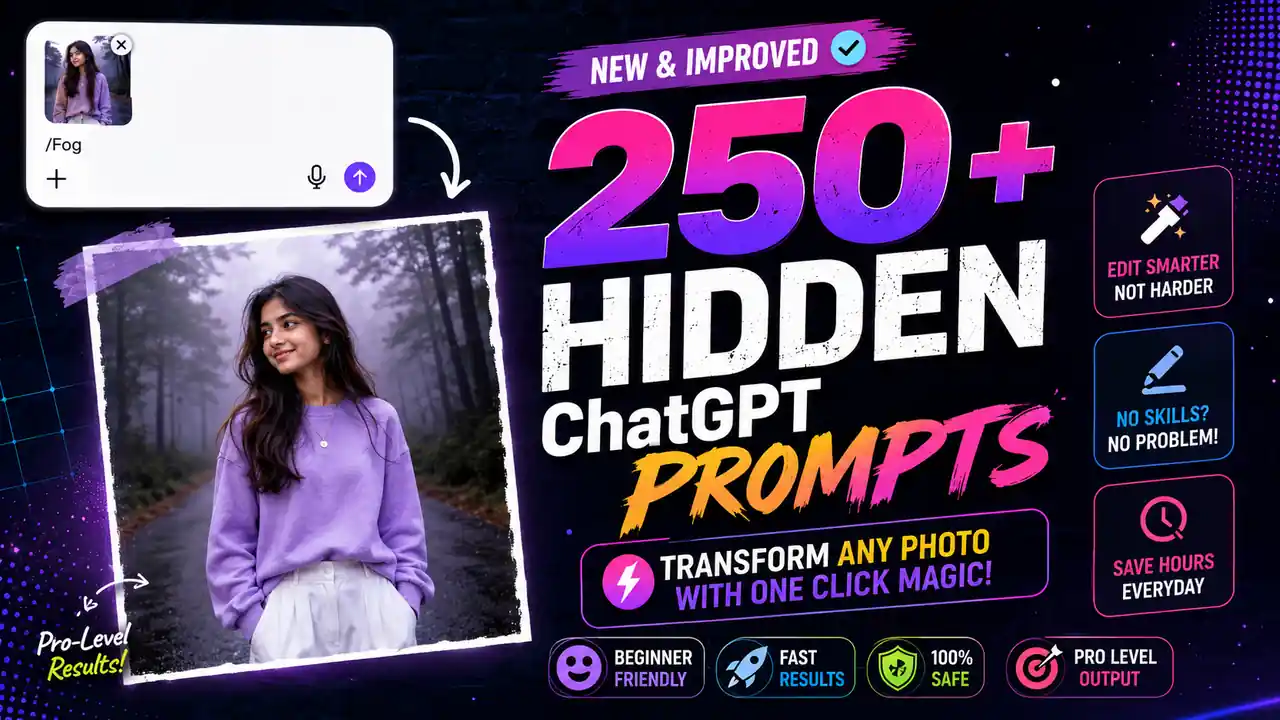
Copy and use any command with your AI image editorThe thumbnail above represents a simple idea: upload your image, describe the transformation you want, and use a carefully written prompt to guide the edit.
But there’s an important distinction many people miss.
A prompt isn’t a magic button that guarantees a perfect result every time. The quality of the original photograph, the instructions you provide, the AI model you’re using, and the type of transformation all affect the final image.
So rather than relying on random one-line commands, this guide focuses on better prompt structures and practical examples you can actually experiment with.
What Are ChatGPT Photo Editing Prompts?
A photo editing prompt is simply a written instruction that tells an AI image-editing system what you want changed.
For example, instead of saying:
“Make this photo better.”
You could write:
“Improve the lighting while preserving the person’s natural facial features. Add soft cinematic contrast, create a subtle background blur, enhance skin tones naturally, and keep the final image realistic rather than overly processed.”
The second instruction gives the AI considerably more information.
You are specifying:
- What should change
- What should remain unchanged
- The visual style
- The lighting
- The level of realism
- The desired mood
That extra context can make your instructions much more useful.
Why AI Photo Editing Is Becoming So Popular
Traditional photo editing can be extremely powerful, but it often requires learning tools, layers, masks, curves, color grading, selections, and other techniques.
AI-assisted editing takes a different approach.
You can explain your intention in everyday language.
For example:
Traditional mindset:
“I need to create a mask around the subject, separate the background, apply a blur, adjust exposure, and then color-grade the image.”
AI-assisted mindset:
“Keep the person sharp and naturally detailed while creating a soft cinematic blur behind them.”
The second approach doesn’t eliminate the need for editing knowledge, but it can make experimentation much faster.
And that’s particularly useful for:
- Instagram creators
- YouTubers
- Bloggers
- Photographers
- Small businesses
- Online stores
- Personal brands
- Content creators
- Students
- Social-media users
250+ Prompt Ideas You Can Experiment With
Rather than dumping hundreds of nearly identical prompts into one giant list, it’s smarter to organize them by purpose.
Below are practical categories you can use to build your own prompt library.
1. Cinematic Photo Editing Prompts
Cinematic editing is one of the easiest ways to give an ordinary photograph a more dramatic appearance.
Prompt 1
“Transform this photo into a cinematic portrait while keeping the person’s identity, facial structure, clothing, and natural appearance unchanged. Add dramatic but realistic lighting, subtle depth of field, balanced contrast, and professional movie-style color grading.”
Prompt 2
“Give this photograph a modern cinematic look with soft highlights, controlled shadows, natural skin tones, subtle film grain, and atmospheric depth. Keep the result photorealistic.”
Prompt 3
“Create a moody cinematic version of this image using cool shadows and slightly warm highlights. Preserve realistic skin texture and facial details.”
Prompt 4
“Turn this ordinary portrait into a premium movie-poster-style photograph without adding text or changing the person’s facial identity.”
Prompt 5
“Enhance this image with cinematic lighting, realistic shadows, subtle atmospheric haze, and professional color grading while avoiding an artificial AI-generated appearance.”
2. Fog and Mist Prompts
The thumbnail itself uses a misty environment, which can create a powerful visual mood.
Prompt 6
“Add realistic morning fog to the background while keeping the subject sharp and naturally detailed. Make the fog gradually become denser toward the distant background.”
Prompt 7
“Transform the background into a mysterious misty forest while preserving the subject’s original pose, clothing, face, and proportions.”
Prompt 8
“Create a soft atmospheric fog effect with natural light rays passing through the trees. Keep the subject realistic and clearly visible.”
Prompt 9
“Add subtle cinematic mist around the environment without covering the person’s face or body.”
Prompt 10
“Create a cold early-morning atmosphere with realistic fog, muted colors, soft natural lighting, and cinematic depth.”
3. Background Replacement Prompts
One of the most useful AI editing applications is changing the environment around a subject.
Prompt 11
“Replace the background with a modern luxury apartment while keeping the person completely unchanged. Match the lighting, shadows, perspective, and color temperature realistically.”
Prompt 12
“Place the subject on a beautiful tropical beach during golden hour. Preserve the person’s face, body proportions, clothing, and pose.”
Prompt 13
“Replace the current background with a professional studio setup using softbox lighting and a subtle neutral backdrop.”
Prompt 14
“Place the subject in a realistic New York City street scene at night with natural urban lighting and shallow depth of field.”
Prompt 15
“Change the background to a peaceful mountain landscape during sunrise. Make the lighting on the subject consistent with the new environment.”
4. Professional Portrait Prompts
Want a casual photograph to look more like a professional portrait?
Try prompts such as:
Prompt 16
“Convert this casual photograph into a professional portrait while maintaining the subject’s natural facial characteristics. Improve lighting, composition, sharpness, and background separation.”
Prompt 17
“Create a premium editorial portrait with soft studio lighting, realistic skin texture, subtle contrast, and professional depth of field.”
Prompt 18
“Make this photograph look like it was captured using a professional full-frame camera and portrait lens while preserving natural details.”
Prompt 19
“Create a clean professional headshot suitable for a business profile. Keep the expression natural and avoid excessive skin retouching.”
Prompt 20
“Transform the image into a high-end fashion editorial portrait with sophisticated lighting and realistic color grading.”
5. Social Media Photo Prompts
Social media images usually need to grab attention quickly.
Prompt 21
“Optimize this portrait for Instagram while keeping it realistic. Improve composition, lighting, contrast, colors, and background separation without making the image look over-edited.”
Prompt 22
“Create a visually striking social-media portrait with vibrant but realistic colors, clean composition, soft lighting, and strong subject separation.”
Prompt 23
“Give this photo a premium influencer-style aesthetic while preserving natural skin texture and facial details.”
Prompt 24
“Create a trendy editorial Instagram look with subtle film grain, warm highlights, soft shadows, and sophisticated color grading.”
6. Travel Photography Prompts
Travel photographs often become much more interesting when the environment and lighting are enhanced carefully.
Prompt 25
“Enhance this travel photograph with natural vibrant colors, improved dynamic range, realistic sky detail, and cinematic lighting while preserving the authenticity of the location.”
Prompt 26
“Turn this travel photo into a premium adventure photograph with dramatic clouds, natural contrast, enhanced landscape detail, and realistic colors.”
Prompt 27
“Create a warm golden-hour travel photograph while keeping the architecture and environment realistic.”
Prompt 28
“Enhance the scenery without making the colors excessively saturated or artificial.”
7. Fashion Editing Prompts
AI can also help experiment with fashion photography concepts.
Prompt 29
“Turn this portrait into a high-fashion editorial photograph with dramatic studio lighting, sophisticated composition, realistic fabric details, and premium magazine-style color grading.”
Prompt 30
“Create a luxury fashion campaign aesthetic while keeping the model’s facial identity and natural proportions unchanged.”
Prompt 31
“Give this photograph a modern streetwear campaign appearance with urban lighting, cinematic contrast, and realistic environmental details.”
8. Lighting Transformation Prompts
Lighting can completely change the mood of an image.
Prompt 32
“Change the lighting to soft golden-hour sunlight coming from the side. Preserve realistic shadows and maintain natural skin tones.”
Prompt 33
“Create dramatic studio lighting with a soft key light from the left and subtle fill light on the opposite side.”
Prompt 34
“Make this image look like it was photographed during blue hour, with cool ambient lighting and realistic highlights.”
Prompt 35
“Add soft window light coming from the right side while preserving natural facial details.”
9. Night Photography Prompts
Prompt 36
“Transform this image into a realistic nighttime portrait with soft city lights, subtle bokeh, controlled highlights, and natural skin tones.”
Prompt 37
“Create a cinematic night scene with realistic neon reflections and atmospheric lighting while keeping the subject’s face natural.”
Prompt 38
“Turn the background into a sophisticated downtown night environment with realistic streetlights and shallow depth of field.”
10. Color-Grading Prompts
Sometimes you don’t need to change the actual photograph. You simply need better color.
Prompt 39
“Apply a premium cinematic color grade with slightly warm highlights and cool shadows while preserving accurate skin tones.”
Prompt 40
“Give the photograph a soft pastel color palette with gentle contrast and natural skin tones.”
Prompt 41
“Create a dark luxury color grade with rich blacks, controlled highlights, and subtle warm tones.”
Prompt 42
“Apply a vintage film-inspired color grade with subtle grain and faded highlights while keeping the photograph realistic.”
11. Background Blur Prompts
Prompt 43
“Create realistic optical background blur while keeping the subject sharply focused. Match the depth of field to a professional portrait lens.”
Prompt 44
“Separate the subject naturally from the background using realistic depth of field without creating artificial edges around the hair or clothing.”
12. Photo Restoration Prompts
Old or low-quality images can also benefit from AI-assisted enhancement.
Prompt 45
“Restore this photograph by reducing scratches, noise, blur, and compression artifacts while preserving the original facial features and historical character.”
Prompt 46
“Improve the clarity of this old photograph while avoiding plastic-looking skin or invented facial details.”
Prompt 47
“Restore the image naturally and increase apparent detail without changing the identity of the people in the photograph.”
13. Low-Light Enhancement Prompts
Prompt 48
“Improve this low-light photograph by lifting shadow detail, reducing digital noise, and correcting the exposure while preserving the nighttime atmosphere.”
Prompt 49
“Brighten the subject naturally without making the background unnaturally bright. Preserve realistic shadows and colors.”
14. Smartphone Photo Enhancement Prompts
Not every photograph needs to look like a movie.
Sometimes you simply want a better phone photo.
Prompt 50
“Enhance this smartphone photograph with natural exposure, improved dynamic range, realistic colors, cleaner details, and subtle sharpening. Keep it looking like a real photograph.”
Prompt 51
“Improve the image quality while maintaining the original composition and natural appearance.”
The Secret Is Not the Number of Prompts
Here’s where I would challenge the biggest assumption behind thumbnails like “250+ Secret ChatGPT Prompts.”
More prompts don’t automatically mean better results.
A collection of 250 mediocre prompts is less valuable than 20 well-designed prompts that clearly explain:
- What you want changed
- What must remain unchanged
- What visual style you want
- How realistic the result should be
- What should be avoided
That’s the real skill.
A Better Formula for Writing Photo Editing Prompts
You can create surprisingly powerful prompts using this simple structure:
Action + Subject + Environment + Lighting + Style + Preservation + Restrictions
For example:
“Transform this portrait into a cinematic outdoor photograph with a misty forest background, soft morning light, realistic depth of field, subtle film color grading, and natural skin texture. Preserve the person’s facial identity, body proportions, clothing, and pose. Avoid excessive smoothing, unrealistic facial changes, artificial textures, and oversaturated colors.”
That’s far more useful than simply writing:
“Make this photo cinematic.”
Add Negative Instructions
One of the most overlooked techniques is telling the AI what not to do.
For example:
Avoid:
- Plastic-looking skin
- Distorted hands
- Extra fingers
- Unnatural eyes
- Excessive sharpening
- Over-saturated colors
- Artificial HDR
- Unrealistic shadows
- Changed facial identity
- Cartoon-like appearance
- Unnecessary objects
A useful instruction can be:
“Keep the edit photorealistic and avoid changing facial identity, body proportions, clothing details, or natural skin texture.”
This doesn’t guarantee perfection, but it gives the system a clearer target.
How to Get Better Results From One Photo
Don’t immediately ask for ten different changes.
That’s another common mistake.
Instead, work in stages.
Step 1 — Start with the composition
Ask the AI to improve the overall scene.
Step 2 — Fix lighting
Adjust brightness, shadows, highlights, and mood.
Step 3 — Improve colors
Apply the desired color grade.
Step 4 — Refine the background
Add blur, replace the environment, or improve atmospheric depth.
Step 5 — Add finishing touches
Use subtle sharpening, film grain, glow, reflections, or other effects.
This gives you much more control than throwing everything into one giant prompt.
Example: Turning a Normal Portrait Into a Cinematic Image
Suppose you have a simple outdoor portrait.
Instead of:
“Make me look cinematic.”
Try:
“Transform this portrait into a realistic cinematic photograph. Place the subject in a misty forest environment during early morning. Use soft diffused light, subtle atmospheric haze, realistic depth of field, cool blue-gray shadows, and slightly warm skin tones. Keep the person’s face, hairstyle, body proportions, clothing, and pose unchanged. Preserve natural skin texture and realistic details. Avoid excessive retouching, artificial facial changes, unrealistic lighting, and oversaturated colors.”
Notice the difference.
The second prompt gives the AI a visual direction, not just a vague request.
Can ChatGPT Really Edit Any Photo in One Click?
This claim needs some nuance.
AI image-editing capabilities vary depending on the specific ChatGPT version, account, model, region, and feature availability. Some workflows can directly transform uploaded images, while others may be better suited to generating detailed instructions for another image-editing application.
So don’t treat phrases such as “100% working,” “every photo,” or “one-click guaranteed” literally.
AI is powerful, but it isn’t deterministic magic.
A better approach is to treat prompts as creative instructions and iterate when the first result isn’t right.
Tips for More Realistic AI Photo Edits
If you want results that don’t immediately scream “AI,” focus on restraint.
Keep skin texture natural
Over-smoothed skin is one of the quickest ways to make an image look artificial.
Match lighting
If you replace the background, the subject’s lighting should make sense in the new environment.
Don’t overdo color
Extreme saturation may look impressive for two seconds, but it usually destroys realism.
Preserve identity
If the subject is a real person, explicitly ask the system to preserve recognizable facial characteristics.
Be specific about depth
Instead of saying “blur the background,” explain that you want natural optical depth of field with the subject remaining sharply focused.
20 Short Prompts for Quick Experiments
If you don’t want long instructions, here are some shorter ideas:
- “Create a cinematic portrait with natural skin texture.”
- “Add realistic golden-hour lighting.”
- “Give this image a premium editorial look.”
- “Create a subtle film photography aesthetic.”
- “Add realistic background depth.”
- “Turn this into a professional studio portrait.”
- “Create a luxury fashion campaign look.”
- “Add soft morning fog.”
- “Create realistic blue-hour lighting.”
- “Enhance colors without oversaturation.”
- “Improve low-light details naturally.”
- “Create professional portrait depth of field.”
- “Give this image a vintage film aesthetic.”
- “Make the background look more cinematic.”
- “Create realistic soft window lighting.”
- “Improve dynamic range while preserving realism.”
- “Create a moody editorial portrait.”
- “Enhance the subject without changing identity.”
- “Make this look like a professional camera photograph.”
- “Create a clean, premium social-media portrait.”
Final Thoughts
The real advantage of AI photo editing isn’t simply having hundreds of prompts saved in a folder.
It’s learning how to communicate a visual idea clearly.
Once you understand that, you can create your own prompts for almost any situation—whether you want a cinematic portrait, professional headshot, travel photograph, fashion editorial, dramatic night scene, vintage image, or completely different environment.
And remember: the best prompt is not necessarily the longest prompt.
It’s the one that tells the AI exactly what you want without leaving important details to guesswork.
Start with one photograph. Make one meaningful change. Evaluate the result. Then refine it.
That’s how you move from random AI edits to intentional, professional-looking results.