
Introduction
AI video generation has completely changed the way creators make content for platforms like Instagram Reels, YouTube Shorts, and Facebook Reels. What once required professional editing skills, expensive software, and hours of work can now be done in just a few minutes with the help of artificial intelligence.
One of the most popular trends right now is cinematic AI love story videos. These videos feature realistic characters, emotional storytelling, smooth camera movements, and movie-like visuals that easily capture viewers’ attention. The best part is that you don’t need dozens of photos or video clips. With Google Flow AI, you can generate a beautiful romantic video using only one photo of the boy and one photo of the girl.
In this guide, you’ll learn the complete step-by-step process to create a stunning cinematic love story video using Google Flow AI, along with expert tips to achieve the best possible results.
📋 AI Love Story Prompt
What is Google Flow AI?
Google Flow AI is an advanced AI-powered video generation tool designed to transform text prompts and reference images into high-quality cinematic videos.
Instead of manually animating characters or editing footage, the AI understands your prompt and generates realistic scenes with natural expressions, smooth motion, and consistent character appearance.
Some of its impressive capabilities include:
- AI-powered cinematic video generation
- Character consistency across scenes
- Realistic facial expressions
- Natural body movements
- Professional camera movements
- Dynamic lighting effects
- Movie-style storytelling
- High-quality video rendering
Because of these features, Google Flow AI has become one of the most popular tools among AI creators who produce viral short-form videos.
What Do You Need Before Getting Started?
Creating a cinematic love story video is surprisingly simple. Before you begin, make sure you have the following:
- Access to Google Flow AI
- One high-quality photo of the boy
- One high-quality photo of the girl
- A cinematic love story AI prompt
- A stable internet connection
That’s all you need.
Step 1: Open Google Flow AI
Begin by launching Google Flow AI from your browser.
Once you’re inside the platform:
- Create a new video project.
- Choose the video generation option.
- Select the aspect ratio before starting.
For Instagram Reels, YouTube Shorts, and Facebook Reels, the recommended format is 9:16 Vertical.
This ensures your final video is perfectly optimized for mobile viewing.
Step 2: Upload Your Character Images
The next step is uploading your reference images.
Upload:
- One clear photo of the boy
- One clear photo of the girl
These images will be used by the AI to generate consistent characters throughout the entire video.
Best Practices for Uploading Photos
To get realistic results, follow these guidelines:
- Use front-facing portraits.
- Upload high-resolution images.
- Make sure the face is clearly visible.
- Avoid sunglasses or face masks.
- Don’t use heavily edited photos.
- Avoid beauty filters.
- Keep lighting natural.
- Use images with minimal background distractions.
The better your reference images are, the better your final cinematic video will look.
Step 3: Paste Your Cinematic Love Story Prompt
Now comes the most important part.
Paste your carefully written Character Consistency Prompt into Google Flow AI.
A well-crafted prompt tells the AI exactly how the characters should behave and how the video should look.
A good cinematic prompt helps maintain:
- The same face throughout every scene
- Consistent hairstyles
- Matching outfits
- Stable character identity
- Natural facial expressions
- Smooth romantic interactions
- Consistent background style
- Professional cinematic camera movement
- Emotional storytelling
Without a strong prompt, AI-generated videos may produce inconsistent faces or unrealistic scene transitions.
Step 4: Generate the Video
After uploading the images and adding your prompt:
- Review your settings.
- Choose the desired quality.
- Click the Generate button.
Google Flow AI will begin processing your request.
Depending on your account and the complexity of your prompt, video generation may take anywhere from a few seconds to a few minutes.
Once the rendering is complete, you can preview your cinematic love story video.
If you’re satisfied with the result, simply download the final version.
Tips to Get the Best Cinematic Results
Professional-looking AI videos don’t happen by accident. Here are some proven tips to improve your output quality.
1. Use High-Resolution Images
Sharper images allow the AI to detect facial features more accurately.
Blurry photos often lead to distorted faces.
2. Keep Lighting Similar
If both reference photos have similar lighting conditions, the AI can create much smoother transitions between scenes.
Natural daylight usually works best.
3. Use Clear Facial Expressions
Choose photos where both people are looking naturally toward the camera with relaxed expressions.
Avoid exaggerated poses.
4. Select 9:16 Vertical Format
If you’re creating content for social media, vertical videos generally perform much better than horizontal ones.
5. Choose Cinematic Quality Mode
If your account offers multiple rendering modes, select:
- Cinematic
- Ultra Realistic
- High Quality
These modes usually produce smoother animations and better lighting.
6. Add Golden Hour Lighting
Golden-hour lighting gives AI videos a warm, emotional, and premium movie-like appearance.
This style is especially popular for romantic content.
7. Maintain Character Consistency
Always use a prompt that emphasizes consistent facial identity, clothing, hairstyle, and overall appearance.
Character consistency is one of the biggest factors that separates professional AI videos from average ones.
Is Google Flow AI Free?
Google Flow AI may offer limited free access depending on your account and region.
Free users often receive a limited number of video generations or credits.
Premium plans generally provide additional benefits such as:
- More generation credits
- Faster rendering
- Higher-quality exports
- Longer videos
- Advanced cinematic options
- Priority processing
If you plan to create AI videos regularly, upgrading to a premium subscription may be worthwhile.
Why Are AI Love Story Videos Going Viral?
Cinematic AI videos are attracting millions of views because they combine emotional storytelling with visually stunning effects.
Creators are using these videos for:
- Couple edits
- Wedding invitations
- Anniversary surprises
- Romantic reels
- Engagement announcements
- Valentine’s Day content
- Social media storytelling
- Personalized gifts
Since viewers naturally connect with emotional content, these videos often receive higher engagement than standard photo slideshows.
How to Get the Viral Love Story Prompt
If you want to use the same cinematic love story prompt that many creators use for viral AI videos, follow these simple steps:
- Follow @hgpromts.in on Instagram.
- Open the latest Love Story Reel.
- Share the reel with three friends.
- Leave a comment on the reel.
- Visit the Promy AI link available in the Instagram bio.
- Copy the cinematic love story prompt.
- Paste it into Google Flow AI while creating your video.
Using a professionally written prompt can significantly improve character consistency, camera movement, and overall cinematic quality.
Final Thoughts
Google Flow AI makes it incredibly easy to create stunning cinematic love story videos using just two photos. You don’t need professional editing skills, expensive software, or years of animation experience. By simply uploading a clear image of each person, adding a well-crafted cinematic prompt, and selecting the right quality settings, you can generate realistic romantic videos that look like scenes from a movie.
Whether you’re creating content for Instagram Reels, YouTube Shorts, Facebook Reels, or making a special video for someone you love, Google Flow AI offers a fast and creative way to bring your memories to life. Combine high-quality reference images with a strong character consistency prompt, and you’ll be able to produce professional-looking AI videos that stand out and have the potential to go viral.
Cinematic 4K photorealistic video, 15 seconds, natural golden hour light. Widetree-lined Bangalore city boulevard, tall rain trees overhead canopy, warmamber sunlight through leaves, dappled gold on tarmac, ambient city sounds.BEAT 1 — 0:00 to 0:04: Young Indian man from @Image1 stands on near-sidefootpath beside a black bike, facing camera. Black hair, clear glasses, darkbrown linen button-up shirt white buttons chest pocket sleeves rolled, creamwide-leg pleated trousers, white sneakers, silver watch left wrist from@Image3. Head slightly down casually checking his watch, relaxed andcompletely unaware. Black Porsche 911 GT3 enters from left at road speed —horn blares once — car sweeps through foreground in shallow focus blurblocking full road view for one second, powerful wind whoosh as it passes.BEAT 2 — 0:04 to 0:07: Car clears frame — slow motion begins instantly. Onthe opposite footpath directly across, a young Indian woman from @Image2steps off the far kerb beginning to cross — walking straight toward camera.Car’s wind wake hits her at this exact moment — straight dark hair explosivelylifting and blowing toward camera. Black fitted full-sleeve top, red bandhaniwave-print tiered maxi skirt billowing forward around her legs, black white ikatdupatta with tassels flying toward camera, silver oxidised necklace andbangles catching golden light, flat kolhapuri sandals from @Image4. She walksstraight forward facing camera, eyes ahead, calm natural expression,completely unaware of him on the opposite pavement. BEAT 3 — 0:07 to 0:10:Cut to tight front close-up of the man’s face. Head lifted from watch, eyeswide and still fixed straight across the road, mouth barely parted, glassescatching soft golden light. Pure quiet stunned stillness. First sight. No theatrics.Completely natural. BEAT 4 — 0:10 to 0:12: Cut back to her — slow motion —mid-road walking straight toward camera, red skirt swaying, dupatta tasselsdrifting, hair gradually settling. She never glances toward him. Fully in her ownworld. BEAT 5 — 0:12 to 0:15: Slow motion close-up of her beautiful face.Straight dark hair softly blowing and settling, warm amber light falling acrossher features, soft skin, dark expressive eyes looking straight ahead, gentlenatural expression, silver earrings catching light. Quiet effortless beauty. Shestill does not know. Shallow depth of field, warm golden bokeh tree canopybehind. Wind sound fading to silence. Anamorphic lens, natural bokeh, nofilters, no music. Diegetic sound only — car horn, wind whoosh, ambient cityhum, fading breeze. Pure documentary realism. No jump cuts. Is Prompt Ka Copy Prompt Wala Code do
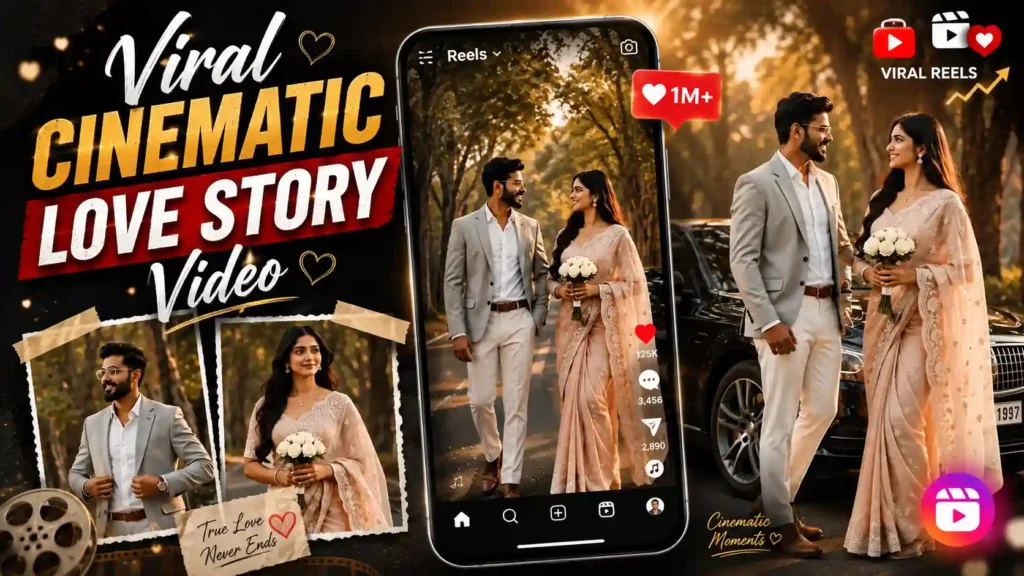
CONSISTENT LOVE STORY VIDEO MASTER PROMPT (SHORT) Use the uploaded Boy and Girl reference images as the ONLY identity references. Preserve both identities 100% exactly throughout the entire video. Create one permanent character model for each person and reuse the same characters in every frame. Never regenerate, beautify, morph, swap, or alter their faces, hairstyles, skin tone, body proportions, expressions, outfits, or accessories. Identity consistency is the highest priority and overrides all artistic decisions. Video: 9:16 Vertical | 15–20 seconds | Ultra-realistic | 8K HDR | Luxury Bollywood romance | Premium wedding film | 85mm cinematic lens | Golden-hour lighting | Dreamy bokeh | Soft warm color grading | Smooth gimbal camera | Slow-motion | Natural movements. Location A peaceful tree-lined avenue with giant banyan trees forming a green tunnel. Warm golden sunlight filters through the leaves. Empty road. A luxury black car is parked beside the road. The location remains unchanged throughout the video. Outfit Lock Boy: Light grey tailored blazer, white shirt, white trousers, brown belt, brown formal shoes, luxury wristwatch, transparent eyeglasses. Girl: Pastel blush-pink embroidered saree, flowing transparent pallu, floral earrings, minimal necklace, white flower bouquet. No outfit or color changes. Scene Sequence 1. Boy stands beside the luxury black car adjusting his blazer. 2. Girl walks gracefully toward him holding a white bouquet as her saree flows in the breeze. 3. Medium tracking shot of the boy smiling while watching her. 4. Cinematic close-up of the girl with soft smile, natural hair movement, and golden rim light. 5. Boy slowly walks toward the girl with gentle eye contact. 6. They stand together, smiling naturally without hugging or kissing. 7. Both walk slowly toward the camera through the dreamy tree tunnel as sunlight shines through the leaves. End with a smooth cinematic fade. Quality Rules Maximum facial similarity, maximum temporal consistency, natural expressions, realistic body proportions, stable identity, consistent outfits, consistent background, no extra people, no face flickering, no identity drift, no hairstyle changes, no body changes, no AI artifacts, no text, no watermark, no logo.
CONSISTENT LOVE STORY VIDEO MASTER PROMPT (SHORT) Use the uploaded Boy and Girl reference images as the ONLY identity references. Preserve both identities 100% exactly throughout the entire video. Create one permanent character model for each person and reuse the same characters in every frame. Never regenerate, beautify, morph, swap, or alter their faces, hairstyles, skin tone, body proportions, expressions, outfits, or accessories. Identity consistency is the highest priority and overrides all artistic decisions. Video: 9:16 Vertical | 15–20 seconds | Ultra-realistic | 8K HDR | Luxury Bollywood romance | Premium wedding film | 85mm cinematic lens | Golden-hour lighting | Dreamy bokeh | Soft warm color grading | Smooth gimbal camera | Slow-motion | Natural movements. Location A peaceful tree-lined avenue with giant banyan trees forming a green tunnel. Warm golden sunlight filters through the leaves. Empty road. A luxury black car is parked beside the road. The location remains unchanged throughout the video. Outfit Lock Boy: Light grey tailored blazer, white shirt, white trousers, brown belt, brown formal shoes, luxury wristwatch, transparent eyeglasses. Girl: Pastel blush-pink embroidered saree, flowing transparent pallu, floral earrings, minimal necklace, white flower bouquet. No outfit or color changes. Scene Sequence 1. Boy stands beside the luxury black car adjusting his blazer. 2. Girl walks gracefully toward him holding a white bouquet as her saree flows in the breeze. 3. Medium tracking shot of the boy smiling while watching her. 4. Cinematic close-up of the girl with soft smile, natural hair movement, and golden rim light. 5. Boy slowly walks toward the girl with gentle eye contact. 6. They stand together, smiling naturally without hugging or kissing. 7. Both walk slowly toward the camera through the dreamy tree tunnel as sunlight shines through the leaves. End with a smooth cinematic fade. Quality Rules Maximum facial similarity, maximum temporal consistency, natural expressions, realistic body proportions, stable identity, consistent outfits, consistent background, no extra people, no face flickering, no identity drift, no hairstyle changes, no body changes, no AI artifacts, no text, no watermark, no logo.
Good