
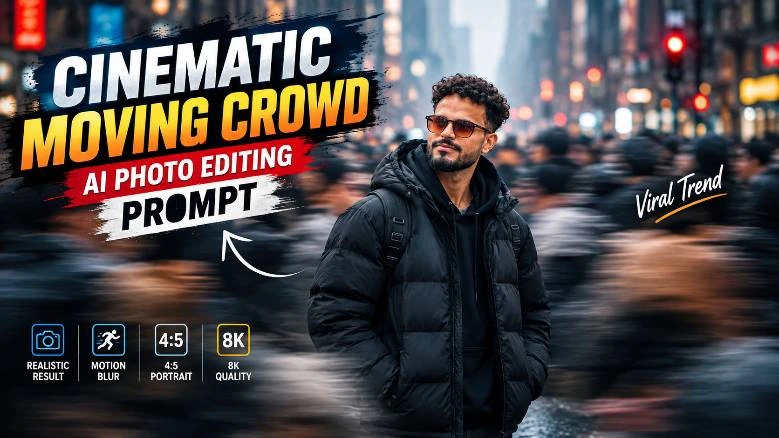
There are certain effects in AI image editing that can turn a simple portrait into an entirely different cinematic photograph.
Crowded city + motion blur + sharp subject is one such prompt combination.
This style places the subject in the middle of a busy urban street while the hundreds of other people around him are rendered as motion-blurred streaks.
It’s a neat effect that juxtaposes the fast-moving city against a single frozen character, creating an interesting visual narrative.
In this article, we’ll be analyzing this cinematic urban portrait prompt in detail, including how the reference image, the camera angle, motion blur, lighting, clothing, and identity preservation were handled.
Images And Prompt
Image 1
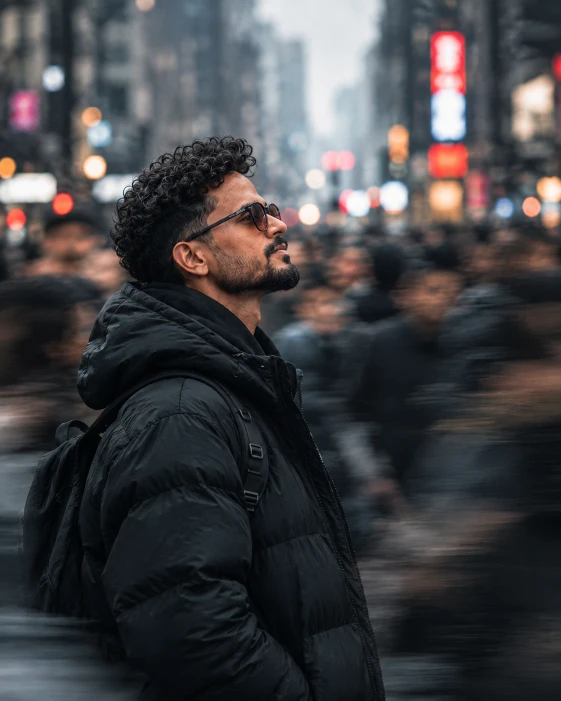
prompt
Create a highly realistic cinematic urban portrait using the uploaded reference image as the primary identity reference. Preserve the same face, facial features, hairstyle, beard, skin tone, body proportions and overall identity.
A young South Asian man stands still in a crowded modern city street, captured from a left-side three-quarter/profile angle while looking slightly upward with a calm expression. He wears a black oversized puffer jacket, black hoodie and black backpack.
Keep the man perfectly sharp and frozen while the surrounding crowd moves rapidly with realistic horizontal motion blur. Busy downtown street, tall buildings, atmospheric haze, colorful city lights, red and orange bokeh and misty urban atmosphere.
50mm lens, f/1.8, shallow depth of field, slow shutter photography, subject tracking, realistic optical motion blur, cinematic lens compression. Vertical 4:5 composition, subject slightly left, soft overcast lighting, cool teal-gray tones, natural skin tones, subtle warm highlights, film grain, premium editorial photography, photorealistic 8K quality.
IMPORTANT: Use the uploaded reference image to preserve the exact identity. Do not replace the face with a generic model or distort the face and body.
Image 2
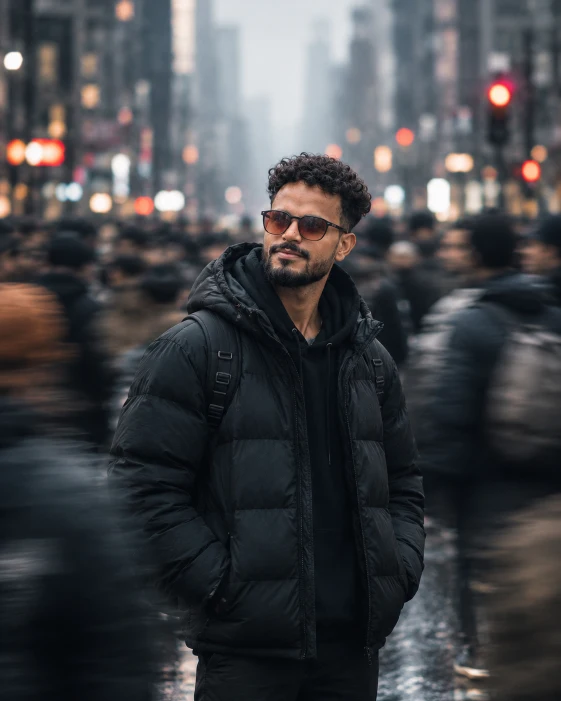
Prompt
Create a highly realistic cinematic street portrait using the uploaded reference image. Preserve the exact same face, facial features, hairstyle, beard, skin tone, body proportions and identity.
A young South Asian man stands still in a crowded city street wearing a black oversized puffer jacket, black hoodie and backpack. He looks slightly upward with a peaceful smile. Keep his face and body perfectly sharp while the surrounding crowd has strong horizontal directional motion blur, creating a frozen-subject effect.
Busy urban street, blurred pedestrians, distant city lights, red and white traffic lights, atmospheric mist and circular bokeh. Overcast cinematic lighting, natural skin texture, cool teal-gray tones with subtle warm red highlights.
Professional full-frame camera, 50mm lens, f/1.8, shallow depth of field, slow-shutter motion effect, subject tracking, realistic optical motion blur and natural lens compression.
Vertical 4:5 portrait, centered subject, cinematic negative space, eye-level/slightly low angle, premium editorial photography, soft film grain, HDR, photorealistic 8K quality.
IMPORTANT: Maintain the exact identity from the reference image. Do not change the face, eyes, nose, lips, beard, hairstyle or skin tone. No plastic skin, distorted body, hands or overlapping people
Image 3
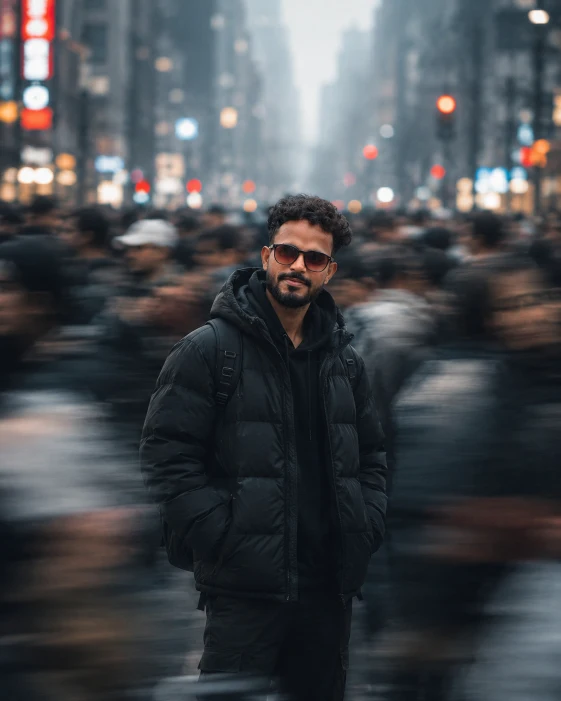
prompt
Create a highly realistic cinematic portrait using the uploaded reference photo as the primary identity reference. Preserve the exact same facial identity, face shape, eyes, nose, lips, hairstyle, beard, skin tone and natural proportions.
A young South Asian man stands completely still in the center of a busy modern city street, surrounded by a large crowd moving rapidly in different directions. He wears a black oversized puffer jacket over a black hoodie and looks slightly toward his left with a calm, serious and thoughtful expression.
Keep his face, hair and upper body extremely sharp and perfectly frozen while every surrounding pedestrian has strong realistic horizontal directional motion blur. Motion blur should be strongest around the foreground and sides, with some blurred people passing in front of the lower body, but never covering or distorting the face.
Busy downtown street, tall buildings fading into atmospheric haze, pedestrians, distant traffic lights, red and warm-white bokeh lights and slightly foggy urban atmosphere.
Use slow shutter-speed photography around 1/10–1/4 second, subject tracking, realistic optical motion blur, professional full-frame camera, 50mm lens, f/1.8, shallow depth of field, cinematic compression and natural perspective.
Vertical 4:5 composition, centered subject, medium/full-body framing, eye-level camera angle, strong cinematic depth. Soft overcast daylight, cool gray and muted blue-green tones, subtle warm red/orange highlights, deep natural shadows, teal-gray cinematic color grading and subtle film grain.
Premium cinematic street photography, photorealistic, natural skin texture, realistic hair strands, detailed jacket fabric, realistic motion physics, HDR detail, professional color grading, 8K photographic quality.
IMPORTANT IDENTITY LOCK: Use the uploaded reference photo to preserve the exact same recognizable person. Do not replace the face with a generic model, change facial features, or distort the face and body
What Is the Cinematic Urban Motion Blur Effect?
For the purposes of this article, it’s best to think about this particular effect as urban motion blur portrait or frozen subject photography.
Imagine a busy street with a massive number of people walking around.
The camera exposure is set to a slow shutter speed in order to create motion-blurred streaks from the people.
Meanwhile, the main subject in the center remains almost completely frozen and sharp.
The resulting image would have a similar look to this:
Moving Crowd + Frozen Subject + Cinematic City Background
Why This Effect Is So Interesting
The contrast between the motion-blurred pedestrians and the sharp subject is the main reason why this prompt turns out so interesting.
In the standard portrait photography, the subject is kept sharp while the background is blurred.
But in this case, the background is rendered with additional motion blur, the crowd has directional motion blur, the buildings have a slight atmospheric haze, and the subject himself remains perfectly still.
As a result, the visual weight is shifted towards the character, which creates an interesting dynamic.
The look is great for fashion photography or portraits, as well as various cinematic AI-generated images.
Reference Image Is the Most Important Element
Speaking of the subject, it’s important to note that the most important element of this prompt is actually identity preservation.
When using a reference image, it’s always critical to make sure that the subject in the generated image is actually the same person depicted in the reference photo.
In this prompt, the user specifies that the same facial identity, face shape, hairstyle, beard, skin tone, and body proportions should be used.
This way, the generic male model suggested by the prompt won’t be used in favor of the uploaded reference image.
While the words “use the reference image” may seem sufficient, it’s always better to specify exactly what you want.
The Main Character
As mentioned, the character in the middle of the city street is completely sharp and frozen, while the people around him are rendered as motion-blurred streaks.
He’s a young South Asian man, captured in a slightly left-side three-quarter/profile view.
His facial expression is calm and thoughtful, and he’s looking slightly upwards and to the sky.
The reason for this particular setup is that the subject needs to look interesting and composed, juxtaposed against the busy city background.
If the character was also moving, it would make the entire image much less dynamic.
That’s why the prompt instructs to keep him still and sharp.
Left-Side Three-Quarter / Profile Angle
The character is intentionally captured from the left-side three-quarter/profile view, rather than a straight-on frontal view.
This way, his facial features are better seen and defined.
His jawline is visible, as well as the shape of the nose, and the hair isn’t lying flat across his face.
The three-quarter view also adds to the perceived depth in the portrait, while the left-side profile adds to the general interest of the image.
In this case, the slightly upward look adds to the contemplative and editorial feel of the photograph.
Looking Toward the Sky
The subject’s face is slightly turned toward the sky in this prompt.
Once again, this decision adds to the general feel of the image.
Looking directly at the camera may be fine for a standard portrait, but in this case, it would make the generated image feel less interesting or dynamic.
That’s why the prompt instructs to make the character look slightly upward: it adds to the cinematic and editorial appeal of the image.
It helps to establish a better visual balance, as well as improve the general mood.
As a result, the words “thoughtful expression” were added to the prompt.
In this case, an exaggerated smile or a dramatic facial expression would actually hurt the appeal of the image.
Black Puffer Jacket + Hoodie
The character is dressed in dark clothing, with an oversized black puffer jacket, black hoodie, and a black backpack.
This way, his clothes blend into the general urban environment, rather than standing out from it.
But at the same time, the dark color palette allows for decent separation from the bright lights in the background.
The puffer jacket also adds to the overall visual appeal of the image, as its texture is rendered in exquisite detail by the AI.
Black Backpack
The backpack is another crucial element in this portrait, as it helps to sell the location and setting.
In this case, it makes the character look more like an average city dweller, rather than a traditional studio model who was placed into a city street intentionally.
That’s why, in the prompt, the backpack is kept visible over the character’s shoulders at all times.
The Most Important Effect: Motion Blur
Now, let’s talk about the most important element of this prompt: the motion blur.
As mentioned, the subject is kept sharp and motion-free, while the people in the background are rendered as directional motion-blurred streaks.
This way, the camera exposure is slow enough to capture the movement of the city, but it’s still fast enough to keep the main character frozen in time.
It gives the image a nice visual contrast and juxtaposes the character against the busy street.
The prompt asks to make sure that the blurred pedestrians are completely unrecognizable.
Meanwhile, the background buildings are kept slightly hazy.
All of this combines into a nice visual separation between the subject and the environment.
Why Horizontal Blur Is Important
In this case, the prompt specifically mentions horizontal blur, as opposed to random or directional blur.
The reason is simple: horizontal blur adds to the general motion feel, making it easier to tell that the image was created with a slow shutter speed.
If the blur was random, it would simply make the image look out of focus.
But the horizontal blur indicates the direction of movement.
For example, if the character was moving left to right, his motion trail would also be horizontal.
As a result, the blur direction in this prompt was specifically mentioned.
Busy Downtown City Background
The prompt doesn’t just say “a city street background.”
Instead, it describes a busy downtown urban environment with tall buildings, a large crowd of people, traffic lights, and city lights.
This way, the image isn’t generic or overly simple.
By specifying the type of environment, as well as the atmospheric haze, distant traffic, and red/orange bokeh highlights, we’re telling the AI to avoid making the image too generic or realistic.
Red and Orange Bokeh
In this case, the prompt specifically mentions red/orange bokeh lights in the background.
They add to the general color separation between the character and the environment, as well as provide nice visual contrast for the whole image.
In effect, the cool colors of the character’s face and clothes are separated from the warm colors of the building lights.
It helps to make the image more interesting and dynamic, while also giving it a nice cinematic appeal.
For example, cool colors like blue or teal can be contrasted with warm colors like red, orange, and amber.
Atmospheric Haze
The prompt asks to render the buildings in the distance with atmospheric haze, rather than keeping them all sharp and clearly defined.
It adds to the perceived depth within the image and makes the whole composition more interesting.
The subject is sharply focused in the foreground, the people in the background are rendered as motion-blurred streaks, and the buildings are hazy and unfocused.
It creates a nice three-part separation that helps to make the image more dimensional.
Camera Settings Used in the Prompt
The prompt asks to use professional full-frame camera equipment.
This way, the generated image appears more realistic and detailed.
The 50mm lens was specifically mentioned, as it provides an excellent field of view without warping the perspective and distorting the subject’s facial features.
Using f/1.8 aperture adds to the visual appeal, as it provides an excellent separation between the subject and the background.
Slow Shutter Speed
The slow shutter speed is the one responsible for all of the motion blur throughout the image.
As mentioned, it creates the visual contrast between the sharp subject and the blurred environment.
In most cases, a slow shutter speed would make the entire image blurry.
But in this particular case, the subject is also kept sharp: he’s not moving, which is why he isn’t affected by the camera’s slow exposure speed.
Subject Tracking
When analyzing this prompt, it’s also important to note that it suggests using subject tracking.
In most cases, slow shutter speed photography keeps everything in the image blurry, including the subject.
But when using subject tracking, the camera follows the subject and keeps him sharp while rendering everything else as motion-blurred streaks.
It’s a neat effect that makes the image much more interesting.
In fact, this is the main reason why this entire prompt was written the way it was.
Lighting
The lighting conditions are fairly simple: the prompt asks to use soft overcast daylight rather than direct sunlight.
It ensures that there aren’t any harsh shadows on the subject’s face, while also allowing the details of his face and clothes to be visible.
It keeps everything realistic and avoids making the image look too artificial or fake.
Cool Teal-Gray Color Grade
The prompt specifically asks to render the image with a cool teal-gray color grade.
It adds to the overall cinematic appeal without making the image look oversaturated or artificial.
The colors are carefully chosen to provide decent contrast while avoiding extreme colors: the image isn’t fully blue, but it uses cool colors like gray and teal, combined with warm colors like red and orange.
Natural Skin Tone Is Important
One of the most common mistakes in color grading is to shift the skin tone too far towards blue or green.
That’s why, in this prompt, the words “realistic skin tones” were specifically added.
While the overall color grade is cool, the subject’s skin tone remains natural and doesn’t turn green or blue.
4:5 Vertical Composition
The image is rendered in a vertical 4:5 ratio, rather than a standard square or horizontal rectangle.
It makes the image more suitable for Instagram posts or other social media profiles.
The prompt asks to keep the subject slightly to the left side, rather than in the exact center of the frame.
It creates better visual balance within the image, as the blurred city environment takes up more space on the right side, counterbalanced by the subject on the left.
Why Subject Is Positioned Slightly Left
If the subject was placed dead-center, it would make the composition unbalanced.
The blurred city environment would take up too much visual space on the left side, leaving nothing to counterbalance it.
That’s why, in this prompt, the character is slightly shifted to the left in order to counterbalance the larger blurred area on the right side.
It makes the image more interesting and less “center-heavy.”
It also helps to create a cinematic feel that’s more suitable for editorial photography.
Realistic Details
It’s also worth noting that the prompt asks for realistic details.
The main subject should have realistic facial features, including skin pores, facial hair, and even visible beard texture.
The same goes for the clothes: the fabric has to look realistic.
Realistic optical blur, HDR details, and film grains also contribute to the overall realism of the final image.
Why “Photorealistic” Alone Isn’t Enough
In many prompts, the word “photorealistic” is used in order to make the image look more authentic and realistic.
But, in reality, this word often doesn’t impact the image all that much.
That’s why, in this prompt, we see numerous references to photorealistic elements.
The camera equipment, lighting, skin tone, facial features, fabric, and optical blur all combine to make the final image look realistic.
Identity Lock Section
At the end of the prompt, the identity lock is mentioned once again.
It reinforces the most important instructions and ensures that the AI uses the reference image to generate the final output.
The most important aspects include using the same person, facial identity, face shape, hairstyle, beard, skin tone, body proportions, and overall appearance.
The words “keep the same facial features” and “avoid distorting the face” are especially important, as they ensure that the final image reflects the same identity as the reference photo.
Complete AI Prompt
Copy-Ready Prompt
Create a highly realistic cinematic urban portrait using the uploaded reference photo as the primary identity reference. The same person, facial identity, face shape, hairstyle, beard, skin tone, body proportions and overall appearance should be maintained throughout the prompt.
A young South Asian man stands still in the center of a busy modern city street. Capture him from a left-side three-quarter/profile view, making sure to show his face as he looks slightly upward toward the sky with a calm, thoughtful expression.
He wears a black oversized puffer jacket over a black hoodie and has a black backpack over his shoulders. His facial hair and beard are natural and detailed.
The man is perfectly sharp and frozen in time while hundreds of other people move rapidly around him. Every single one of them has realistic horizontal directional motion blur applied, thus creating the effect that the entire world is moving while the subject remains completely still.
Background: busy downtown city street, tall buildings with atmospheric haze, large crowd of people, motion-blurred pedestrians, distant traffic lights, colorful city lights, red and orange bokeh, soft white highlights, misty urban atmosphere.
Camera: professional full-frame camera, 50mm lens, f/1.8, shallow depth of field, slow shutter-speed photography, subject tracking, realistic directional optical motion blur, cinematic lens compression.
Composition: vertical 4:5 portrait, medium close-up/full upper-body framing, character is placed slightly to the left side, plenty of blurred city environment on the right, strong three-part visual separation between the subject, blurred crowd, and distant buildings.
Lighting: soft overcast daylight, diffused light on the face, cool gray-blue and teal colors, subtle warm red/orange highlights, deep natural shadows, low-key cinematic atmosphere.
Color grading: muted teal-gray cinematic grade, soft contrast, realistic skin tones, subtle film grain, premium editorial photography, HDR detail.
Photorealistic, ultra-detailed, realistic skin pores, individual hair strands, realistic jacket fabric, natural facial details, professional cinematic photography, 8K quality.
IMPORTANT IDENTITY LOCK: The uploaded reference photo must determine the person’s identity. Do not replace the face with a generic model. Keep the exact same facial features and recognizable identity. Do not distort the face or body.
How to Get Better Results
One thing to remember when using this prompt is that you should avoid using a low-resolution reference image.
The better the quality of the reference photo, the better the identity preservation will be in the final image.
In particular, it’s best to use a high-resolution reference image with a clearly visible face.
If possible, avoid using overly distorted photos or photos with heavy shadows, as they may negatively impact the identity generation.
In addition, you should use image-reference strength if it’s available in your AI tool, as it will allow you to prioritize the identity preservation.
Background elements should also be changed carefully: remember that you need to keep the subject consistent throughout the prompt.
10002